What Can Email AI Do? Uses and Limitations
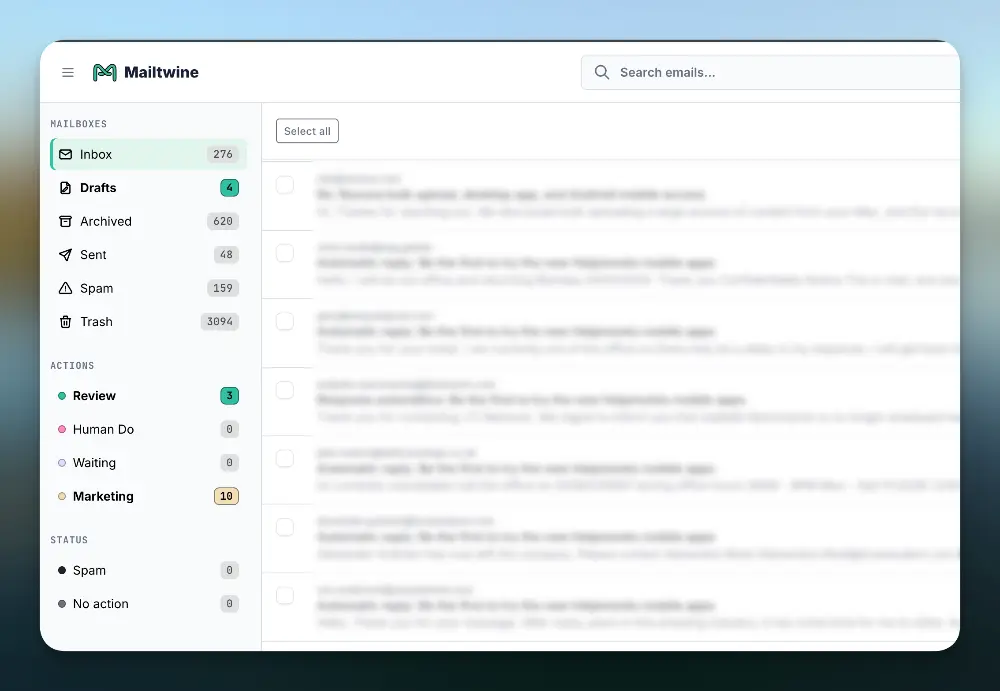
Email AI is software that uses artificial intelligence to help read, classify, prioritize, summarize, route, and draft responses to email. It reduces the manual work required to manage busy inboxes, especially for teams handling support, sales, operations, recruiting, finance, or shared mailboxes.
This guide covers what email AI does, where it helps, where it has limits, and how tools like Mailtwine use AI-powered email triage to decide what should be answered, archived, assigned, or deferred.
Why Traditional Inbox Workflows Fail
Most inbox systems still depend on manual review. Someone opens the inbox, scans every message, decides what matters, moves emails into folders, writes replies, and tries not to miss anything.
That model breaks when email volume grows.
Common problems include:
- Too much manual scanning: Every message competes for attention, even low-value updates and automated notifications.
- No reliable priority system: Important customer, vendor, or internal emails sit beside newsletters and routine alerts.
- Slow response times: Teams waste time deciding what to handle before they can start handling it.
- Missed follow-ups: Emails that need later action get buried under new messages.
- Inconsistent sorting: Different people use different folders, labels, and rules.
- Shared inbox confusion: Teams cannot always tell who owns which message.
- Rule overload: Static filters break when senders, subjects, and workflows change.
Traditional email rules help with simple logic, such as “move emails from this sender to this folder.” They do not understand context, urgency, tone, intent, or business priority. That is where email AI changes the workflow.
What Is Email AI?
Email AI is the use of artificial intelligence to interpret email content and automate inbox decisions. Instead of relying only on sender addresses, keywords, or manual folders, email AI can analyze the meaning of a message and recommend or take the next action.
Email AI can help with:
- Prioritizing urgent emails
- Sorting messages by topic, sender, customer, or workflow
- Summarizing long threads
- Drafting replies
- Routing emails to the right person or team
- Detecting follow-up requirements
- Identifying low-priority or no-action messages
- Supporting email triage across individual and shared inboxes
The goal is not to replace human judgment in every situation. The goal is to remove repetitive inbox decisions so people can spend more time on work that needs judgment.
How Email AI Changes Inbox Management
Email AI improves inbox workflows by turning an unstructured message queue into a prioritized worklist. The inbox stops being a chronological pile and becomes an action system.
From Manual Scanning to AI-Powered Prioritization
Most inboxes are sorted by time received. That is not the same as priority.
Email AI can evaluate messages based on signals such as:
- Sender type
- Customer or account status
- Urgency in the message
- Topic or request category
- Thread history
- Keywords that indicate escalation
- Whether the email requires a response
- Whether the message is informational only
For example, a customer cancellation request should not sit below a software update notification just because the notification arrived later. AI prioritization helps surface the message that needs attention first.
From Static Rules to Context-Aware Sorting
Email automation rules usually work on fixed conditions:
- If sender is X, move to folder Y
- If subject contains “invoice,” apply label Z
- If message comes from a domain, forward it to a team
These rules are useful, but limited.
Email AI can sort based on meaning. It can identify that three different emails are all about billing, even if none of them use the exact word “invoice.” It can also separate a billing question from a payment failure, refund request, or contract renewal.
This matters for teams that receive varied messages with inconsistent wording.
From Long Threads to Short Summaries
Long email threads slow teams down. Someone has to read the full history before they know what changed, what was promised, and what needs action.
Email AI can summarize:
- The main issue
- Key decisions
- Open questions
- Next steps
- Who is waiting on whom
- Relevant dates or commitments
This is useful when emails are reassigned, escalated, or reopened after several days.
From Blank Replies to AI-Assisted Drafts
Email AI can draft replies based on the message content, previous thread context, and common response patterns.
Good AI reply drafting should support the human operator, not send unchecked messages automatically in sensitive workflows.
Useful draft types include:
- Acknowledgement replies
- Request-for-information replies
- Status update replies
- Routing or handoff messages
- Polite decline messages
- Follow-up reminders
For customer-facing teams, this can reduce time spent writing routine responses while still allowing review before sending.
From Inbox Chaos to Email Triage
Email triage is the process of deciding what to do with each email: answer now, assign, archive, defer, escalate, or ignore.
Email AI makes triage faster by recommending or applying those decisions automatically. This is different from basic sorting because triage focuses on action, not just organization.
For a deeper workflow guide, see the related pillar page: Email Triage: A Better Way to Handle Inbox Overload.
Email AI vs Email Automation vs Email Sorting vs Email Triage
These terms overlap, but they are not the same.
| Concept | What It Means | Example | Best For |
|---|---|---|---|
| Email AI | Uses AI to understand and act on email content | Summarizing a customer complaint and marking it urgent | Context-aware inbox decisions |
| Email automation | Uses rules or triggers to perform email actions | Auto-forwarding invoices to finance | Repeatable workflows |
| Email sorting | Organizes emails into categories, folders, or labels | Moving vendor emails into a supplier folder | Inbox structure |
| Email triage | Decides what action each email needs | Answer now, assign, defer, archive | Prioritized work management |
| Email triage software | Tool built to manage triage at scale | AI classifies, prioritizes, and routes emails | Teams with high email volume |
Bottom line: Email AI is the intelligence layer. Email automation executes repeatable actions. Email sorting organizes messages. Email triage decides what should happen next.
Where Email AI Creates Value
Email AI is most useful when the inbox is tied to business operations, not casual communication. Here are practical use cases.
1. Prioritizing Customer Support Emails
Support inboxes often contain urgent issues, routine questions, internal notifications, and low-priority updates in the same queue.
Email AI can identify:
- Escalation language
- Angry or frustrated tone
- High-value customer messages
- Service outages
- Refund or cancellation requests
- Messages that need a human response
The result is a queue where agents can handle urgent issues first instead of reading emails in arrival order.
2. Sorting Shared Team Inboxes
Shared inboxes create ownership problems. Multiple people see the same messages, but no one is always sure who should respond.
Email AI can classify incoming emails by:
- Department
- Topic
- Customer type
- Required action
- Urgency
- Responsible team member
This helps teams route emails without relying on one person to monitor the inbox all day.
3. Summarizing Long Vendor or Client Threads
Operations, legal, finance, and account teams often work through long threads with multiple participants.
Email AI can create short summaries that show:
- What the thread is about
- What changed since the last response
- What decisions were made
- What needs approval
- What deadline is involved
This makes handoffs faster and reduces rereading.
4. Drafting Routine Responses
Many emails do not require original writing. They require a clear, correct response based on known context.
Email AI can help draft replies for:
- “We received your request”
- “Please send more information”
- “Your issue has been assigned”
- “Here is the next step”
- “We need approval before proceeding”
- “This request belongs to another department”
Human review still matters, especially for customer, legal, HR, and finance messages. But AI drafts reduce the blank-page problem.
5. Detecting Emails That Need Follow-Up
Follow-ups are easy to miss because they do not always look urgent when they arrive.
Email AI can detect phrases and patterns such as:
- “Can you confirm?”
- “Please approve”
- “Waiting on your response”
- “Can we decide by Friday?”
- “Following up on”
- “Let me know if this works”
It can then tag, prioritize, or defer the email for later action.
6. Reducing Low-Value Inbox Noise
Many inboxes are filled with emails that do not require action:
- System notifications
- Newsletters
- Delivery confirmations
- Calendar updates
- Automated reports
- CC-only messages
- FYI messages
Email AI can separate these from messages that need a reply. This gives teams a cleaner view of actual work.

How Mailtwine Powers AI Email Triage
Mailtwine is email triage software built to help companies sort and prioritize emails automatically using advanced AI.
It works as an intelligence layer for busy inboxes, especially where teams need more than folders and rules.
Mailtwine supports workflows such as:
- AI-powered email classification: Identify what an email is about without relying only on keywords.
- Automatic triage: Decide whether an email should be answered, assigned, deferred, archived, or reviewed.
- Priority detection: Surface urgent or important messages earlier.
- Inbox sorting: Group emails by topic, workflow, sender type, or action needed.
- Shared inbox support: Help teams handle inbound email without unclear ownership.
- Native integrations: Works with Helpmonks, Fastmail, and IMAP.
- Microsoft 365 support coming soon: Mailtwine is expanding support for Microsoft 365 office accounts.
Mailtwine is designed for teams that need AI to reduce inbox overload, not just decorate email with another label system.
Related pages in the topic cluster:
- Email Triage: A Better Way to Handle Inbox Overload
- Email Automation for Busy Teams
- AI Email Sorting Strategies
- Email Triage Software: Features to Look For
Best Practices for Implementing Email AI
Email AI works best when it supports a clear inbox process. Do not start with automation before deciding what the inbox should do.
Use these steps:
- Define your triage categories first
Decide what actions matter: answer now, assign, archive, defer, escalate, or review. AI needs a clear workflow target. - Separate priority from category
“Billing” is a category. “Urgent billing issue from key customer” is a priority. Treat them as different signals. - Keep humans in the loop for sensitive replies
Use AI drafts for speed, but require human review for legal, HR, finance, customer escalation, and account-risk messages. - Start with one high-volume inbox
Test email AI on a support, operations, or shared team inbox before expanding across the company. - Review AI decisions regularly
Check whether emails are being sorted, prioritized, and routed correctly. Adjust categories and rules as workflows change. - Connect AI triage to team ownership
Sorting is not enough. Every actionable message should have a clear owner or next step.
FAQ
What is email AI?
Email AI is software that uses artificial intelligence to understand, organize, prioritize, summarize, and draft responses to email. It helps reduce manual inbox work by identifying what each message is about and what action it needs.
How does AI decide which emails are important?
AI can evaluate signals such as sender, topic, urgency, sentiment, thread history, and whether the message requires a response. In business inboxes, priority can also depend on customer status, escalation language, or operational impact.
Is email AI the same as email automation?
No. Email automation follows predefined rules or triggers, while email AI interprets email content and context. Many modern workflows use both: AI decides what a message means, and automation applies the next action.
Can email AI sort my inbox automatically?
Yes. Email AI can sort emails by sender, topic, urgency, department, customer type, or required action. Unlike basic filters, AI sorting can work even when emails use different wording for the same issue.
Can email AI write replies?
Yes, many email AI tools can draft replies based on the incoming message and thread context. For business use, AI-generated replies should usually be reviewed before sending, especially for customer-facing or sensitive topics.
Who should use email AI?
Email AI is useful for teams that receive more email than they can process manually. Common users include support teams, operations teams, sales teams, finance teams, agencies, and companies managing shared inboxes.
Conclusion
Email AI turns the inbox from a message pile into a prioritized workflow. It helps teams sort, summarize, triage, and respond faster without relying only on manual scanning or brittle rules.
Mailtwine brings AI-powered email triage to companies using Helpmonks, Fastmail, IMAP, and soon Microsoft 365 office accounts. If your team spends too much time deciding what to do with email, Mailtwine is built to automate that first layer of inbox work.
Ready to reduce inbox overload? Try Mailtwine and start triaging email with AI.





