Email Triage With AI: Classify, Prioritize, Route, Approve

A customer reports that they cannot access their account. A supplier sends a routine invoice. A colleague forwards a long thread and asks, "Can someone take this?" If all three land in the same shared inbox, someone has to determine what each message needs before anyone can do the work.
Email triage is the first decision layer in the inbox: what matters, who owns it, and what happens next. A useful triage process does more than sort messages into folders. It turns incoming mail into an action queue, with urgent work visible, an owner for each request, and a review step before a reply goes out.
Mailtwine uses AI to help teams make that first pass. The workflow is straightforward: classify, prioritize, route, and approve. People still handle uncertain cases and decisions that require judgment.
What email triage includes
Traditional email triage means reading each message, identifying the request, deciding how soon it needs attention, and either handling it or passing it to the right person. In a team inbox, the last decision is often the hardest. A message can be correctly labeled "billing" and still sit unanswered if nobody owns it.
For each thread, aim to establish four things:
- Type: Is this a support request, sales inquiry, billing issue, internal update, or something else?
- Priority: Does it need action now, later today, or only if someone follows up?
- Owner: Which person or team is responsible for the next step?
- Next action: Should someone investigate, draft a reply, seek approval, set a follow-up, or close the thread?
The result should be more useful than an organized inbox. Anyone opening the queue should be able to tell which work is waiting and what would move it forward.
How AI changes the first pass
Rules and folders are useful when a decision depends on a stable signal, such as a destination address. They are less useful when two messages from the same sender require different treatment. A supplier's monthly statement can wait; a message from that supplier about a failed delivery may need immediate attention.
AI triage can interpret the request and thread context rather than relying only on a subject line or sender rule. In Mailtwine, that first pass can support classification, prioritization, summaries, routing, and draft replies. This saves a reviewer from reopening every conversation just to work out what happened and who should act.
AI should not turn uncertainty into a confident-looking assignment. If a thread contains conflicting requests, an unclear deadline, or an unfamiliar commitment, the useful outcome is to surface it for a person to review. A shorter queue is only an improvement if important messages remain visible.
The four-step email triage workflow
1. Classify the request
Start with what the sender needs, not the label you want to apply. A message saying, "The invoice looks wrong and our service has stopped," contains both a billing question and a service problem. Classifying it only as billing could hide the more immediate issue.
For recurring mail, define a small set of categories that reflect the work your team actually does. Include an "unclear" path rather than forcing every message into a category. Thread summaries can help reviewers check a suggested classification against the conversation, especially when the latest reply makes little sense on its own.
Decision at this step: What kind of work is this, and does the thread contain more than one request?
2. Prioritize by consequence
Urgency is not the same as an email marked "high importance." Look for the consequence of waiting: an active outage, a deadline, a customer unable to proceed, or a decision blocking another team. A polite message with a firm contract deadline may outrank one with "URGENT" in the subject line but no immediate action required.
Set practical priority definitions before automating the queue. For example:
- Act now: A service interruption, time-sensitive exception, or escalation with an immediate owner needed.
- Act next: A customer or operational request that needs a response within the team's normal handling window.
- Review later: An informational update or non-urgent request that can wait without blocking work.
The definitions matter more than the names. Mailtwine can help surface higher-priority threads, but your team needs to decide what "high priority" means for its inbox. For a closer look at ranking messages, see Mailtwine's email prioritization approach.
Decision at this step: What happens if this thread waits, and how soon must someone act?
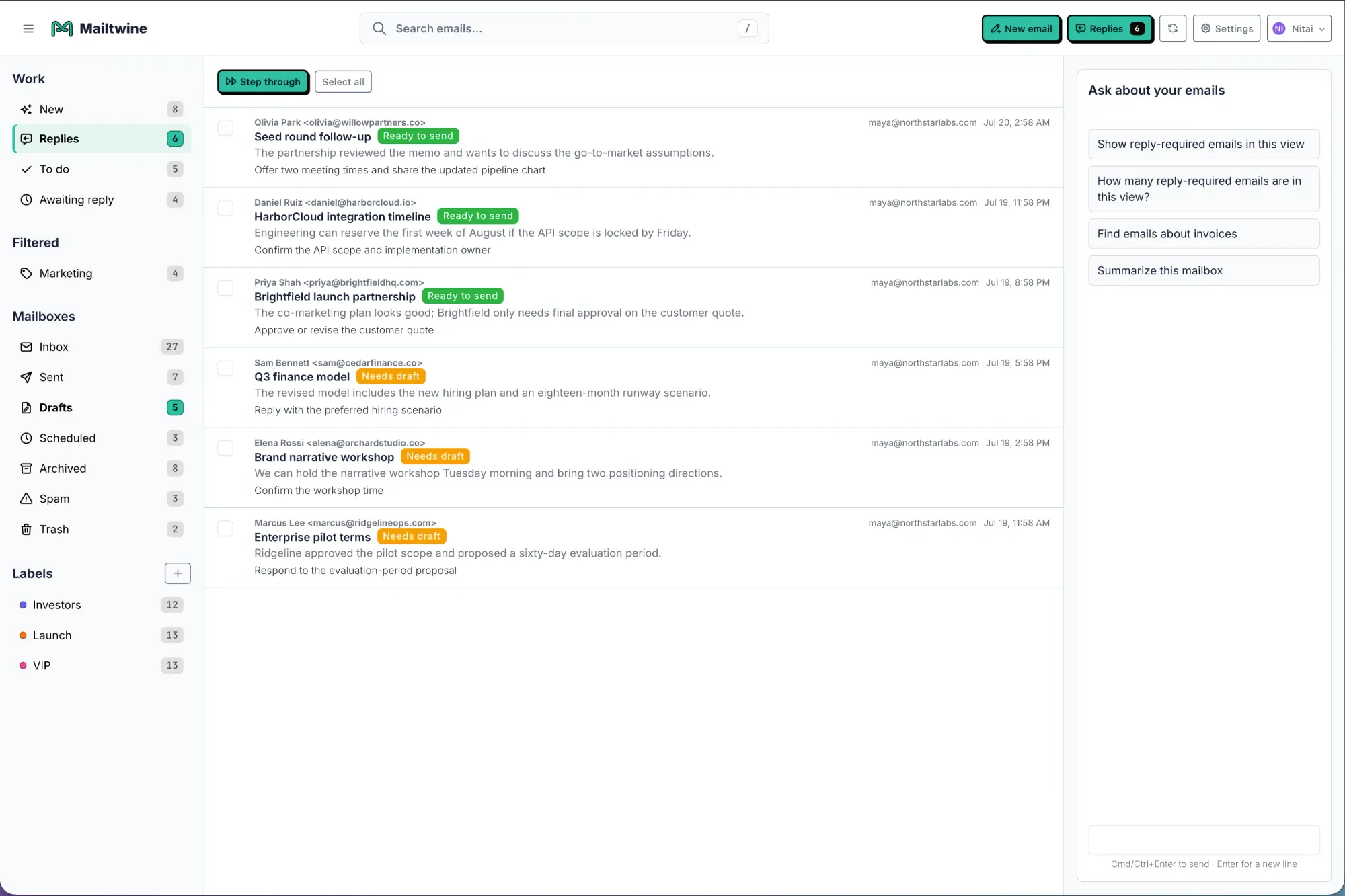
3. Route to an accountable owner
Routing should end with ownership, not merely another label. A shared inbox often fails at the handoff: one person assumes billing has the message, while billing assumes support is replying.
Map common request types to a primary owner or team. Then define an exception path for mixed or ambiguous threads. If a customer reports both a failed payment and lost access, one person should own the customer response even if resolving it requires help from two teams. The owner can coordinate the work without making the sender chase separate replies.
Mailtwine helps teams route and assign inbox work while keeping the conversation connected to its status and next action. Check the result in the queue: is there one clear owner, or has the thread simply moved to a different place where it can be overlooked?
Decision at this step: Who is responsible for moving this thread forward?
4. Approve the action
Triage is not finished when a draft appears. The owner needs to check that the proposed reply addresses the current request, reflects the thread history, and makes only commitments the team can keep.
Mailtwine can prepare drafts for review and supports approval-based workflows. The default is review before sending, not unrestricted auto-send. Its pricing and workflow details describe a narrower option in which an admin can approve an exact rule version for limited auto-send; changing that rule revokes the approval. Keep sensitive promises, exceptions, and uncertain answers with a human reviewer.
Approval can also mean deciding not to reply yet. A thread may need an investigation, an internal handoff, or a follow-up when new information arrives. Record that next step so "waiting" does not become "forgotten."
Decision at this step: Is the response ready to send, or what must happen first?
Put the workflow to work on one inbox
Begin with one address or shared queue where manual sorting takes time and missed handoffs have a cost. Connect the mailbox, choose a few request categories, set priority definitions, and name the owner for each common case. Mailtwine works with existing mailbox environments, including Helpmonks, Fastmail, and IMAP; confirm the connection and setup that fit your team's provider before changing its process.
Then review a sample of real incoming threads. For each one, compare the suggested classification and priority with what an experienced teammate would choose. Check whether routing produced an owner and whether a draft is safe and useful. When the first pass is wrong, adjust the workflow before applying it to more mail.
Consider a message that says, "Our shipment hasn't arrived, and we need a status update before noon." A useful triage result identifies the delivery exception, raises its priority because of the deadline, assigns the person responsible for shipment updates, and prepares a response for that person to verify. A poor result labels it "shipping" and leaves it in a folder. The difference is whether the message has moved toward resolution.
As the queue runs, watch for three problems: urgent threads left at low priority, messages without an owner, and drafts that require substantial correction. These tell you more about triage quality than the number of emails automatically sorted. If your team works across accounts, the broader action-queue approach to AI inbox management shows why status and ownership matter alongside sorting.
The workflow stays the same across providers, but the setup and day-to-day experience differ. See the dedicated guides for Gmail email triage and organizing Outlook email with AI when working through those mailbox-specific choices.
A successful first pass leaves each actionable message with a clear type, a defensible priority, an owner, and a next step. That is the point of email triage: less time deciding where work belongs, and more time doing it.