7 AI Email Tools for Outlook Workflows in 2026

If your Outlook inbox is where work happens, an AI email assistant should save time without making you leave the inbox to do it. The best tools do more than draft replies. They help you sort, prioritize, summarize, route, and approve messages inside the flow of work.
That matters because most inbox pain is not writing. It is triage. You open Outlook, scan a flood of messages, decide what needs attention now, and try to keep important threads from sinking. The right assistant reduces that daily sorting burden.
Below are seven Outlook AI email assistants worth looking at in 2026, plus what each one is best for and where it fits in a real inbox workflow.
What to look for in an Outlook AI email assistant
A good Outlook assistant should help with the work around email, not just the text inside it.
Look for:
- Native Outlook support: The tool should work inside Outlook or connect cleanly to Microsoft 365.
- Fast triage: It should identify urgent, important, or owner-specific messages quickly.
- Reply help: Drafting support is useful, but it should stay under your control.
- Routing and approval: For teams, the best tools help move messages to the right person and preserve review steps.
- Thread context: Good assistants keep the full conversation attached so replies are grounded.
- Low-friction setup: If you need a week of configuration before it helps, adoption usually drops.
7 best Outlook AI email assistants in 2026
1. Microsoft Copilot for Outlook
Copilot is the most natural starting point if you want an assistant that fits directly into Microsoft’s ecosystem. It is built for users who already live in Microsoft 365 and want help summarizing threads, drafting replies, and catching up faster.
Best for: Teams that want native Microsoft tooling and straightforward writing help.
Why it stands out: It works where Outlook already works, so there is less context switching. For many users, that makes adoption easier than adding a separate inbox layer.
2. Third-party GPT-based Outlook add-ins
A third-party GPT-based add-in can be an option if your main need is flexible drafting help inside Outlook. It is useful when you want to rephrase a reply, adjust tone, or generate a quick response from a message draft.
Best for: Users who want writing support more than inbox operations.
Why it stands out: It brings general-purpose AI into the email window, which can help when you are drafting customer replies, follow-ups, or internal notes.
3. Mailtwine
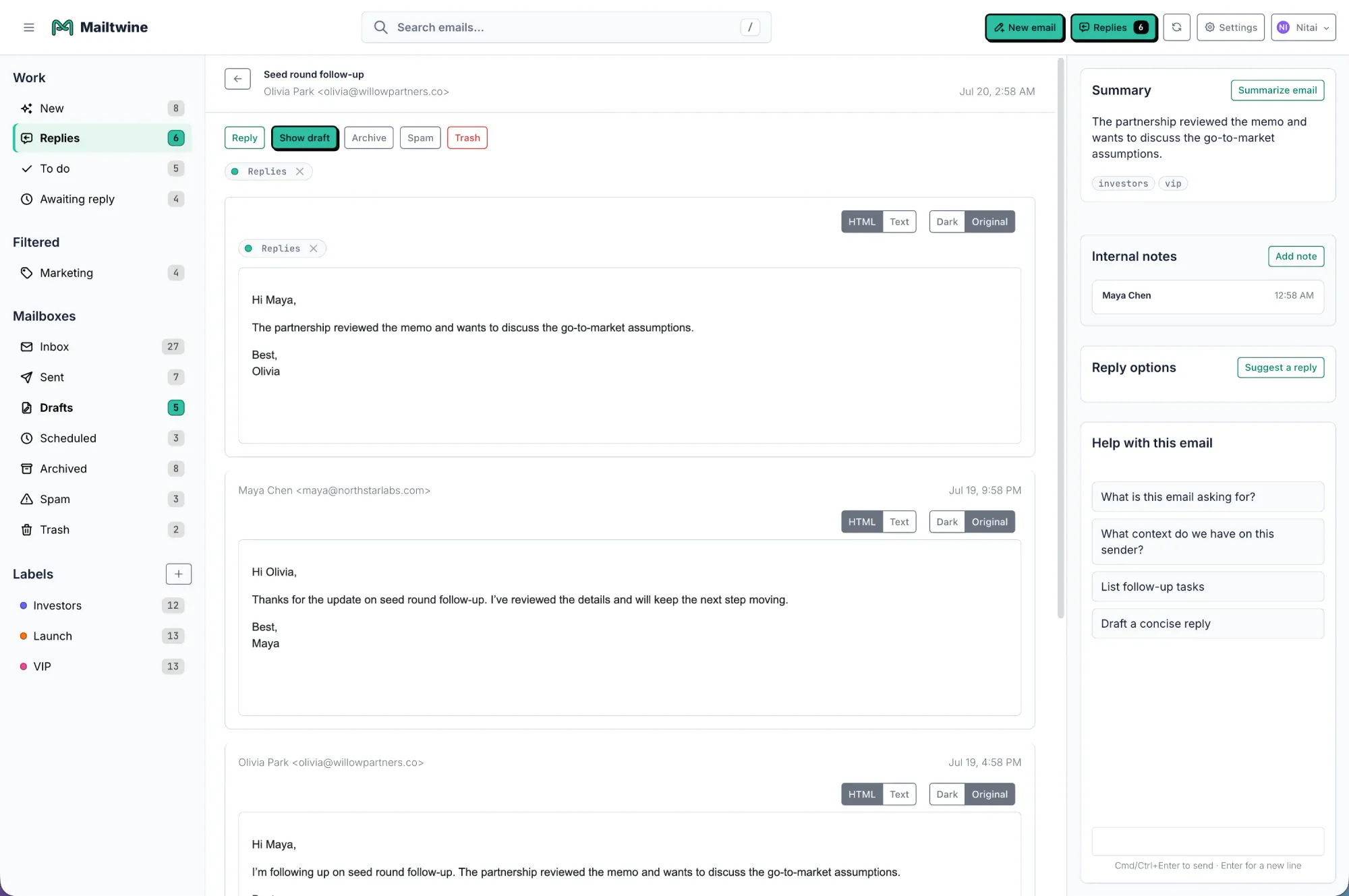
Mailtwine is built for email triage, not just response generation. It helps teams classify incoming mail automatically, prioritize what matters, route it to the right owner, and keep approvals attached to the thread. It works natively with Helpmonks, Fastmail, and IMAP today, with Microsoft 365 support through Microsoft OAuth.
Best for: Teams that need Outlook-style inbox work to become a clear action queue.
Why it stands out: Most AI email tools focus on writing. Mailtwine focuses on the full workflow between reading and replying. That makes it especially useful for support, sales, shared inboxes, and any team that needs email to move, not just sound better.
4. Superhuman AI
Superhuman is known for speed, keyboard-driven email handling, and a polished interface. Its AI layer is most appealing for people who process a high volume of mail and want faster reading, drafting, and follow-up behavior.
Best for: Power users who care about speed and a streamlined inbox experience.
Why it stands out: It is designed around rapid handling of email, which can be a fit if your pain is volume and time, not just message quality.
5. SaneBox
SaneBox is less about writing and more about reducing inbox clutter. It helps filter, sort, and surface important mail so users can get back to a manageable queue.
Best for: People who mainly want a calmer inbox and less noise.
Why it stands out: If your biggest problem is that Outlook fills up too quickly, a filtering-first tool can be more valuable than an assistant that only drafts replies.
6. Missive AI
Missive is a strong fit for shared inboxes where teams collaborate on replies. Its AI support is useful when several people touch the same message stream and need a clear process for ownership and response.
Best for: Collaborative teams handling shared customer or operations inboxes.
Why it stands out: Shared inbox work usually breaks when ownership is unclear. Missive is useful when your real need is coordination as much as automation.
7. Lyne.ai
Lyne.ai is best known for personalized outbound messaging. If your Outlook workflow centers on sales outreach and one-to-one messaging, it can help create faster first drafts that feel more tailored.
Best for: Sales teams doing outbound email at scale.
Why it stands out: It is more specialized than a general inbox assistant. That can be a benefit if you want personalization, not broad inbox management.
Which Outlook AI email assistant should you choose?
The right choice depends on the job you need done.
- Choose Microsoft Copilot if you want the safest native Microsoft option.
- Choose a third-party GPT-based add-in if you mainly want help writing and rewriting emails.
- Choose Mailtwine if your inbox pain is triage, routing, approvals, and shared ownership.
- Choose Superhuman if you want speed and a sharper daily email workflow.
- Choose SaneBox if reducing noise matters most.
- Choose Missive AI if multiple people work from the same inbox.
- Choose Lyne.ai if your Outlook use case is outbound sales email.
The big difference is this: some assistants help you compose faster, while others help you manage the inbox as an operating system. If Outlook is becoming a queue of decisions, not just a place to send messages, triage-focused tools will usually create more value.
Why native inbox workflows matter
AI email assistants are most useful when they stay close to the inbox. Switching between apps breaks focus, and copying messages into another tool adds friction.
A native or deeply connected workflow helps because it:
- keeps thread context in one place
- reduces copy-paste work
- makes approvals easier
- helps teams decide faster
- lowers the chance that important messages get lost
This is why Outlook-native assistants and inbox-connected triage tools tend to outperform generic AI chat tools for operational email work.
A practical way to test any Outlook AI assistant
Before you commit, test the tool against a real inbox pattern, not a demo thread.
- Feed it a messy inbox: Use real messages, not ideal examples.
- Check prioritization: See whether urgent messages rise to the top for the right reasons.
- Test thread handling: Make sure it understands context across replies.
- Review drafts: Look for accuracy, tone, and how much editing is still needed.
- Try team workflows: If others need to approve or own messages, check that routing is clear.
- Watch setup time: The best tool is the one people actually keep using.
If a tool is good in a demo but awkward in daily use, it will not hold up in a busy Outlook environment.
The bottom line
The best Outlook AI email assistant for 2026 depends on whether you need writing help or inbox control. Microsoft Copilot offers native drafting and summarization. Third-party add-ins may offer drafting support; check the publisher, permissions, and Outlook compatibility before installing. Tools like Mailtwine go further by handling triage, routing, and approvals inside the broader email workflow.
If your inbox is full of messages that need decisions, not just better wording, Mailtwine is the more operational choice. If you only want help composing inside Outlook, a native assistant may be enough.
For teams that want to turn email into a clean action queue, start with the tools that manage the whole thread, not just the reply.




