AI Email Management: What It Is and How It Helps Busy Inboxes

AI email management is the use of AI to sort, prioritize, summarize, draft, route, and approve email work so people spend less time wrestling with the inbox. For teams, it is less about replacing email and more about turning a messy stream of messages into a clear queue of next actions.
If your inbox is where requests, approvals, vendor questions, and internal follow-ups pile up, AI email management gives you a way to handle that work without changing the mailbox people already use. That is where Mailtwine fits: it is email triage software that helps companies manage inbox work automatically with advanced AI features, natively with Helpmonks, Fastmail, and IMAP, with Microsoft 365 support through Microsoft OAuth.
What AI email management actually covers
AI email management is broader than simple triage. Triage helps you decide what to do with a message. Management goes further and helps you carry out the work around it.
A practical AI email management system can:
- prioritize urgent messages first
- summarize long threads
- draft replies from context
- route requests to the right person
- keep approvals in human hands
- archive or defer low-value mail
AI email management: It is the use of AI to reduce manual inbox work while keeping the existing email workflow intact. In a team setting, that usually means fewer missed messages, faster response times, and less time spent re-reading threads just to figure out what needs attention.
This matters because most inboxes were never designed to support operational work. They were designed to receive messages. Teams then end up using the inbox as a task list, a request queue, a handoff system, and a record of decisions all at once.
AI inbox management vs. email triage
The easiest way to understand the difference is this:
- Email triage helps you decide what should happen next.
- AI inbox management helps you decide, route, draft, approve, and keep work moving.
So while triage is part of the process, inbox management is the broader operational layer. Mailtwine is built around that broader use case. It does not just sort messages. It can prioritize, summarize, draft replies, route requests, and keep teams aligned without changing the inbox they already use.
That distinction matters for SEO too, because people search for both the narrow and broad versions of the problem. Some want “email triage software.” Others want “AI email assistant” or “inbox management software.” The real need is usually the same: get email under control without adding another system to check.
Why teams use AI for email management
Most teams do not struggle because they get too much email in the abstract. They struggle because every email may require a different kind of action.
A support inbox needs quick routing.
A shared operations inbox needs approvals.
A sales or partnerships inbox needs fast drafting.
A founder inbox needs prioritization and filtering.
AI helps because it can look at the message, the thread, and the context, then suggest the right next step. That means fewer moments where someone reads the same thread three times and still is not sure whether to reply, assign, archive, or escalate.
For teams, the biggest gains usually come from:
Prioritization
AI can surface messages that deserve attention now, instead of leaving urgent mail buried under low-value updates. That is useful when the inbox fills faster than the team can clear it.
Summarization
Long threads are expensive. A good AI summary helps someone understand the situation faster, especially when a message chain has grown across several replies and internal notes. If summarization is part of the workflow, it should support the decision process, not become the whole product.
Drafting
AI can prepare a response based on the thread, tone, and context. That saves time on repetitive replies and helps teams move faster without sending low-quality responses.
Routing
Many inboxes are really shared workflows. AI can assign a request to the right person or bucket it for the right team, which prevents messages from sitting untouched because nobody knows who owns them.
Approvals
Not every message should go out automatically. The strongest email management workflows keep human approval where it matters, especially for sensitive or high-stakes replies.
Inbox management software for shared workflows
When teams look for inbox management software, they usually want more than a nicer inbox view. They want a system that helps the team work together inside email.
Mailtwine is designed for shared workflows where messages need to be:
- prioritized before they become overdue
- routed to the right person or inbox
- drafted with AI support
- approved before sending
- synced back to the mailbox people already use
That last part matters. A tool only helps if it fits the way the team already works. Mailtwine syncs natively with Helpmonks, Fastmail, and IMAP, so teams can keep their mailbox workflow while adding AI triage on top. Microsoft 365 is supported through Microsoft OAuth.
For companies using shared inboxes, this is the difference between a tool that looks smart and a tool that actually changes how work gets done.
How Mailtwine handles email workflow automation
Email workflow automation does not have to mean rigid rules or a maze of if-this-then-that logic. In practice, the best automation handles the repetitive parts and leaves judgment where humans still matter.
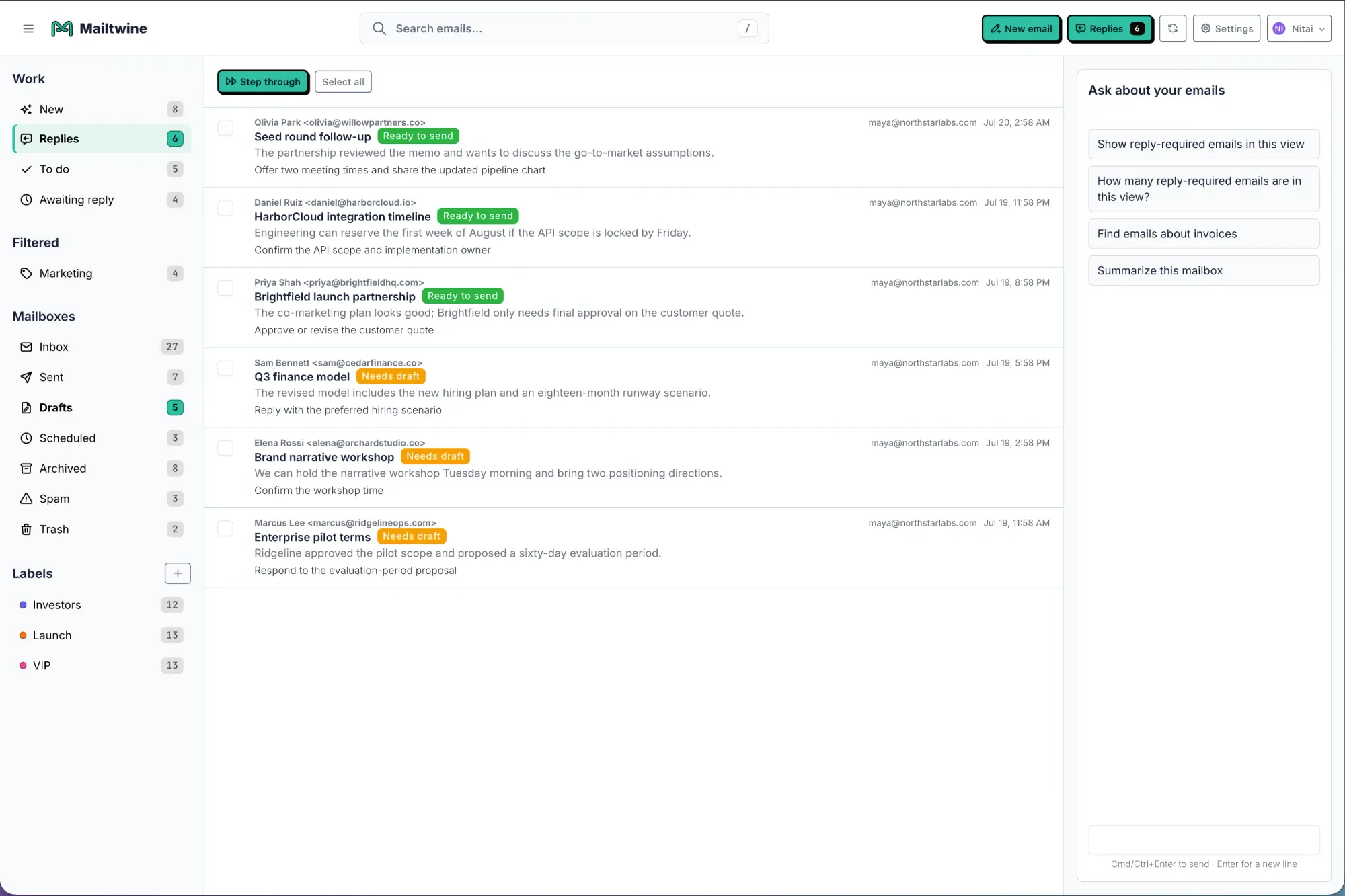
Mailtwine is built around that approach. It helps automate the routine parts of inbox work while preserving human approval when needed.
That can include:
- classifying incoming messages
- marking priority levels
- preparing a draft response
- routing a thread to the right mailbox or teammate
- deferring messages that do not need action yet
- keeping the final decision with a person
This is useful because email is full of patterns, but not every pattern should become a hard rule. A vendor invoice, a customer complaint, and a meeting follow-up may all need different handling even if they arrive in the same inbox.
Where AI email summarizer features fit
Some people search for an AI email summarizer because they are trying to catch up on long threads faster. That is a valid need, but summarization works best as part of a broader workflow.
A summary is useful when it helps the user decide what to do next.
For example:
- Read the summary of a long thread.
- Decide whether the message needs a reply, assignment, or approval.
- Use AI to draft the response or route the request.
- Archive it once the action is complete.
That is why Mailtwine treats summarization as a supporting capability inside triage and management, not as the only thing the product does. Summaries save time, but they are most valuable when they lead to action.
AI email assistant or inbox manager?
People often use these terms interchangeably, but there is a practical difference.
An AI email assistant usually suggests help at the message level.
An inbox manager focuses on the flow of work across the whole mailbox.
Mailtwine fits both ideas, but its core value is closer to inbox management. It helps teams decide what to answer, archive, assign, or defer, while also supporting drafting, routing, and approvals.
That is why the commercial intent behind searches like “AI email assistant” matters. Buyers are usually not shopping for novelty. They want faster decisions, less clutter, and a system that reduces inbox drag without forcing a migration.
Outlook and Gmail use cases
A lot of search intent around AI email management is platform-specific. People want to know whether the tool works in the inbox they already use.
Mailtwine supports email triage workflows for Helpmonks, Fastmail, and IMAP today, with Microsoft 365 support through Microsoft OAuth. That means the product is built for real mailbox environments, not just a single demo surface.
For Outlook-specific workflows, the key question is usually whether the tool works with the mailbox people already have, including Outlook on the web. The answer, in Mailtwine’s case, is that the product is designed to support email triage without forcing teams to change their workflow. Microsoft OAuth provides the connection for teams using Outlook.com and Microsoft 365.
For Gmail and other inboxes, the same principle applies. The point is not to create a new place to check email. It is to make the existing mailbox easier to run.
What to look for in the best AI email assistant
If you are comparing tools, the best AI email assistant is not the one with the most features on a product page. It is the one that fits your workflow with the least friction.
Look for these capabilities:
- Prioritization: Can it separate urgent messages from noise?
- Drafting: Can it help you answer faster without losing context?
- Routing: Can it send the right request to the right person?
- Approvals: Can humans review sensitive messages before they go out?
- Mailbox sync: Does it work with your current inbox instead of replacing it?
- Shared workflow support: Can a team use it together, not just an individual user?
If your inbox is a team system, the product should behave like one. That is why Mailtwine positions itself as email triage software and inbox management software, not just a summarizer or drafting tool.
A simple way to think about AI email management
If your inbox is full of messages that all look equally important, AI email management gives you a way to create order without extra manual sorting.
The process is usually:
- identify what matters now
- summarize what is too long to read fully
- draft or suggest the next response
- route the work to the right owner
- approve anything that needs a human decision
That sequence is easy to understand, but hard to maintain manually at scale. AI helps because it makes the middle steps faster. Teams still stay in control of the final action.
Frequently Asked Questions
What is AI email management?
AI email management is the use of AI to help sort, prioritize, summarize, draft, route, and approve email. It reduces manual inbox work while keeping the existing email workflow in place.
Is AI email management the same as email triage?
No. Email triage is one part of AI email management. Triage helps decide what to do with a message, while AI email management covers the broader workflow around the inbox.
Can AI help with shared inboxes?
Yes. AI can help shared inboxes by prioritizing messages, assigning work, drafting replies, and keeping approvals organized. That makes it useful for support, operations, sales, and other team mailboxes.
Does Mailtwine work with Outlook?
Mailtwine is built to support email triage workflows with native help for Helpmonks, Fastmail, and IMAP, with Microsoft 365 support through Microsoft OAuth. If you use Outlook, connect your existing Microsoft account and evaluate the triage workflow with a focused pilot.
Is summarization a core feature?
Summarization can be helpful, but it works best as part of the triage flow. The main value is deciding what to answer, archive, assign, or defer, then using the summary to act faster.
The takeaway
AI email management is not about adding another inbox tool for the sake of it. It is about making email operational again.
If your team needs a smarter way to prioritize, draft, route, and approve messages, Mailtwine gives you a practical way to manage inbox work with AI while staying inside the mailbox you already use.





