AI Email Summarizer: Turn Long Threads Into Clear Next Steps

A long email thread is only useful if the important parts survive the shortening. If a summary leaves out the current status, owner, deadline, or next action, it saves a few minutes at best and creates more inbox work later.
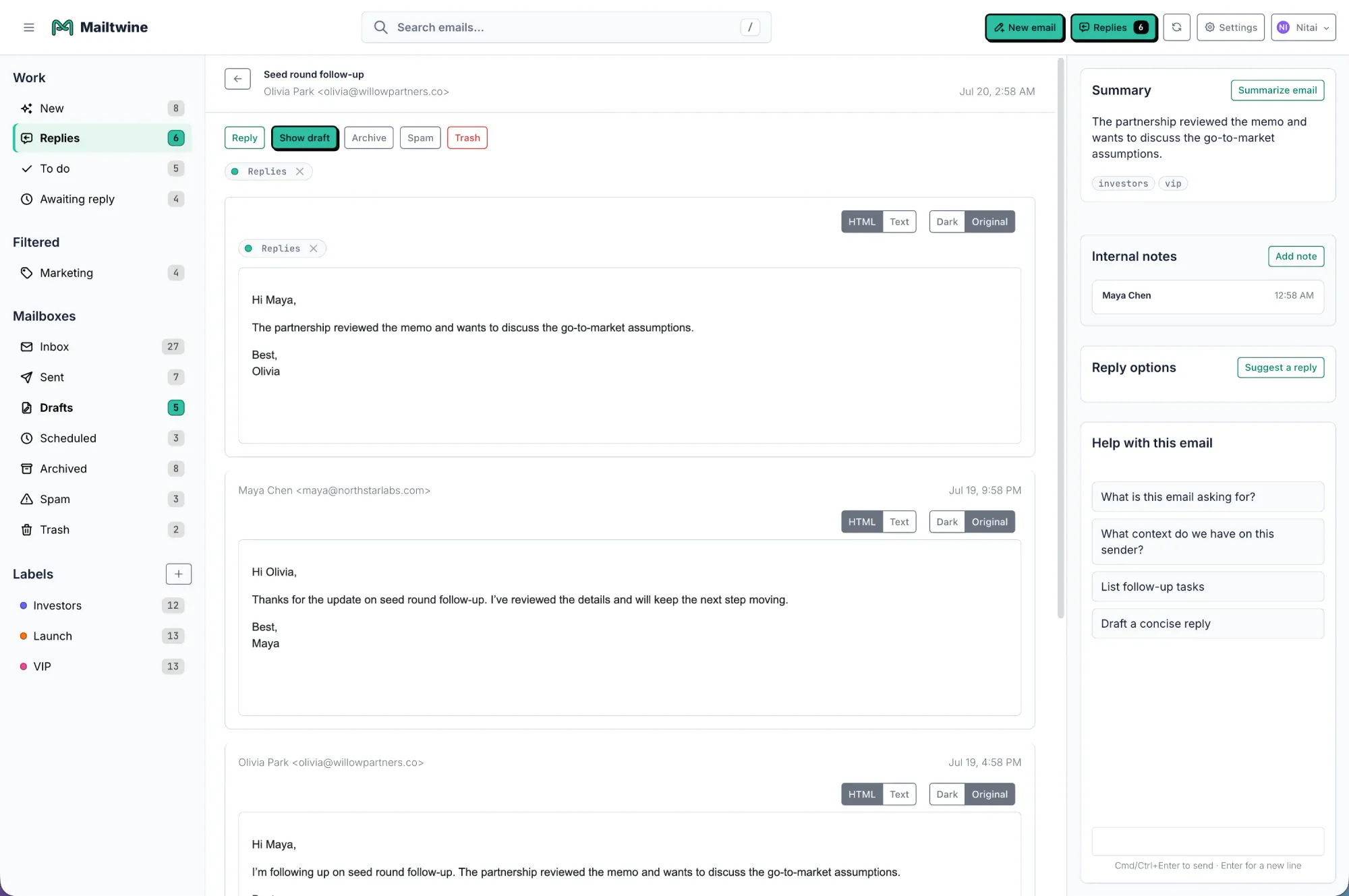
Mailtwine's AI email summarizer is built for team inboxes that need more than a shorter version of the thread. It condenses messages into actionable context so people can move faster on support requests, sales follow-up, internal operations, and other shared inbox work.
What an AI email summarizer should do
A useful summarizer should help someone answer three questions quickly:
- What is this thread about?
- What needs to happen next?
- Who owns the next step?
That means a good summary should include the topic, current status, key decisions, action items, owner, and deadline. If those pieces are missing, the summary is not very useful for triage.
Mailtwine treats summarization as part of the workflow, not a standalone trick. In a busy queue, the summary should help a teammate decide whether to reply, route, escalate, approve, or wait.
Good summaries are action-oriented
A weak summary might say:
- "Customer asked about onboarding."
- "Team discussed the issue."
- "Need to follow up soon."
A stronger summary says:
- Topic: onboarding access request
- Status: waiting on admin approval
- Owner: Support
- Next action: send approval request and confirm once complete
- Deadline: today before 4 p.m.
That second version is much more useful because it turns reading into action.
How Mailtwine uses AI email summarization
Mailtwine condenses long threads into clear summaries that support inbox operations. The goal is not just to reduce text. It is to expose the useful details that sit inside the thread.
That matters most when teams are dealing with:
- shared inboxes
- support queues
- sales handoffs
- operational requests
- approval-based workflows
In those environments, a summary needs to preserve context across multiple messages, multiple people, and multiple decisions. Mailtwine helps teams keep that context attached to the thread so the next person can act without re-reading everything.
What the summary should include
If you are evaluating an AI email summarizer, look for these fields or equivalent output:
- Main topic: what the thread is about
- Current status: what has already happened
- Key decisions: what was agreed
- Action items: what still needs to be done
- Owner: who is responsible
- Deadline: when it needs attention
- Priority: whether it should move now or later
These details matter because a team inbox is not just a reading problem. It is a coordination problem.
Example of a useful team summary
Subject: Refund request for duplicate invoice
Summary: Customer reported a duplicate invoice and asked for a refund. Finance confirmed the invoice was issued twice. Support should reply with confirmation, route the refund request to Finance, and follow up once the credit is processed. Owner: Support. Priority: high. Deadline: same day.
That is the kind of summary that helps teams move.
AI email summarizer vs AI email assistant
An AI email assistant often helps with drafting, rewriting, or quick replies. An AI email summarizer is narrower. It focuses on turning long threads into a readable snapshot.
Mailtwine is different from tools that only help you write faster. It is built for inbox workflows where summarization is one step in a larger process that includes triage, routing, approvals, and assignment.
Here is the practical distinction:
| Capability | AI email assistant | AI email summarizer | Mailtwine workflow system |
|---|---|---|---|
| Draft replies | Often | Sometimes | Yes |
| Summarize threads | Often | Yes | Yes |
| Identify owner | Rarely | Rarely | Yes |
| Route messages | Rarely | Rarely | Yes |
| Support approvals | Rarely | Rarely | Yes |
| Manage team queues | Rarely | Rarely | Yes |
The difference matters because summarizing email is useful, but summarizing alone does not move work forward.
What to look for in an email management tool
If you are searching for an email management tool or email management app, summarize the evaluation around workflow, not just writing features.
Look for:
- Triage: can it sort what matters first?
- Routing: can it send the thread to the right person or team?
- Approvals: can humans review sensitive replies before anything goes out?
- Shared inbox support: can multiple people work the same queue?
- Mailbox integration: does it fit into your current setup without a migration?
Mailtwine is designed around those needs. It connects with Helpmonks, Fastmail, standard IMAP, and Microsoft 365 accounts, so teams can improve their inbox workflow without rebuilding it from scratch.
What is AI inbox management?
AI inbox management is the use of AI to prioritize, summarize, route, and defer inbox work automatically. Instead of manually reading every message first, the system handles the first pass and leaves judgment calls to people.
That is why summarization matters so much. In a real team inbox, the summary is often the first useful layer of context after triage.
Mailtwine fits this model well because it focuses on the operational side of inbox work:
- priority
- owner
- next action
- routing
- approval
- follow-up
If a thread is long, the summarizer helps the team understand it quickly. If a thread is urgent, the workflow helps the team act on it quickly.
What is email workflow automation?
Email workflow automation is the use of rules and AI to move email through repeatable steps such as assignment, drafting, approval, and follow-up. It goes beyond filtering because it helps complete work, not just sort it.
This is where summarization becomes part of a larger system. A summary can trigger or support the next step in the workflow:
- a support ticket can be assigned
- a customer request can be routed
- a sales thread can be handed off
- an internal approval can be requested
- a deadline can be escalated
Mailtwine uses workflow automation to make inbox operations more consistent, especially in shared queues where several people need the same context.
What is an AI email assistant?
An AI email assistant is software that helps with one or more email tasks, usually drafting, summarizing, or sorting. It is useful for reducing manual effort, but it may stop short of managing the queue itself.
That distinction matters for buyers comparing individual productivity tools with team systems. If someone only needs help writing responses, an assistant may be enough. If the inbox needs ownership, routing, approvals, and queue visibility, a workflow system is the better fit.
Mailtwine is built for the second case.
AI email assistant or email operations system?
Here is the simplest way to choose.
| Need | Best fit |
|---|---|
| Faster replies for one person | AI email assistant |
| Short summaries of long threads | AI email summarizer |
| Shared inbox ownership | Email operations system |
| Routing and assignment | Email operations system |
| Human approval before send | Email operations system |
| SLA-aware team queues | Email operations system |
Mailtwine is for teams that need the inbox to behave like an operational queue, not just a writing surface.
Where AI email summarization helps most
Summarization is especially useful when the same thread is read by multiple people or revisited several times.
Common use cases include:
- Support: catch the issue, current state, and next response without rereading the whole chain
- Sales: see the thread history, objections, and next action before following up
- Success: identify customer risk, owner, and escalation path
- Operations: summarize requests, approvals, and pending work
- Leadership: scan long internal threads and decide whether action is required
In each case, the summary should support a decision. If it does not help someone choose what to do next, it is just compressed text.
Why summaries should stay tied to the thread
A detached summary can become stale quickly. A thread can change after one reply, one approval, or one escalation. That is why Mailtwine keeps summarization connected to the inbox workflow itself.
When the summary stays with the thread:
- people do not lose context
- teams do not duplicate effort
- ownership stays visible
- decisions are easier to review
- handoffs are faster
That is especially important in shared mailboxes where several people may touch the same conversation over time.
Related Mailtwine pages
If you want the broader workflow behind summarization, these pages help:
- What is AI email triage?
- How to triage email with AI
- Email triage software
- The email prioritization tool
- AI inbox management software comparison
- AI Email Assistant for Outlook: What It Does and How Mailtwine Fits
If your inbox is mostly Outlook or Microsoft 365, see AI email triage for Outlook and Microsoft 365. If you work in Google Workspace, AI email triage for Gmail and Google Workspace is the better starting point.
Frequently Asked Questions
What does an AI email summarizer do?
An AI email summarizer turns a long email thread into a shorter summary that highlights the main topic, status, and next action. In Mailtwine, that summary is meant to help with triage, routing, and ownership, not just readability.
What should an AI email summary include?
A good summary should include the topic, current status, decisions made, action items, owner, and deadline. If those details are missing, the summary may be short but not useful for workflow.
Is an AI email summarizer the same as an AI email assistant?
No. An AI email summarizer focuses on condensing thread content, while an AI email assistant usually covers broader tasks like drafting, rewriting, and response help. Mailtwine supports summarization as part of a larger inbox workflow system.
Can AI email summarization help shared inboxes?
Yes. Shared inboxes benefit from summaries because multiple people can understand the thread quickly without rereading the full history. It also helps teams preserve context during handoffs, approvals, and escalations.
Does Mailtwine only summarize emails?
No. Mailtwine is an AI email triage system that also helps with prioritization, routing, drafting, approvals, and queue management. Summarization is one part of the workflow.
The best AI email summarizer is the one that helps the team move from reading to action. Mailtwine does that by keeping summaries tied to priority, ownership, and the next step.





