AI Email Summarizer: What It Should Include and How to Use It Well

A good AI email summarizer should do more than shorten a thread. It should tell you what the email is about, whether anything has changed, who owns the next step, and when that step is due.
That matters because most inbox pain is not caused by reading. It is caused by figuring out what to do next. If a summary does not surface the topic, status, action item, owner, and deadline, it may save a few seconds but still leave the real work untouched.
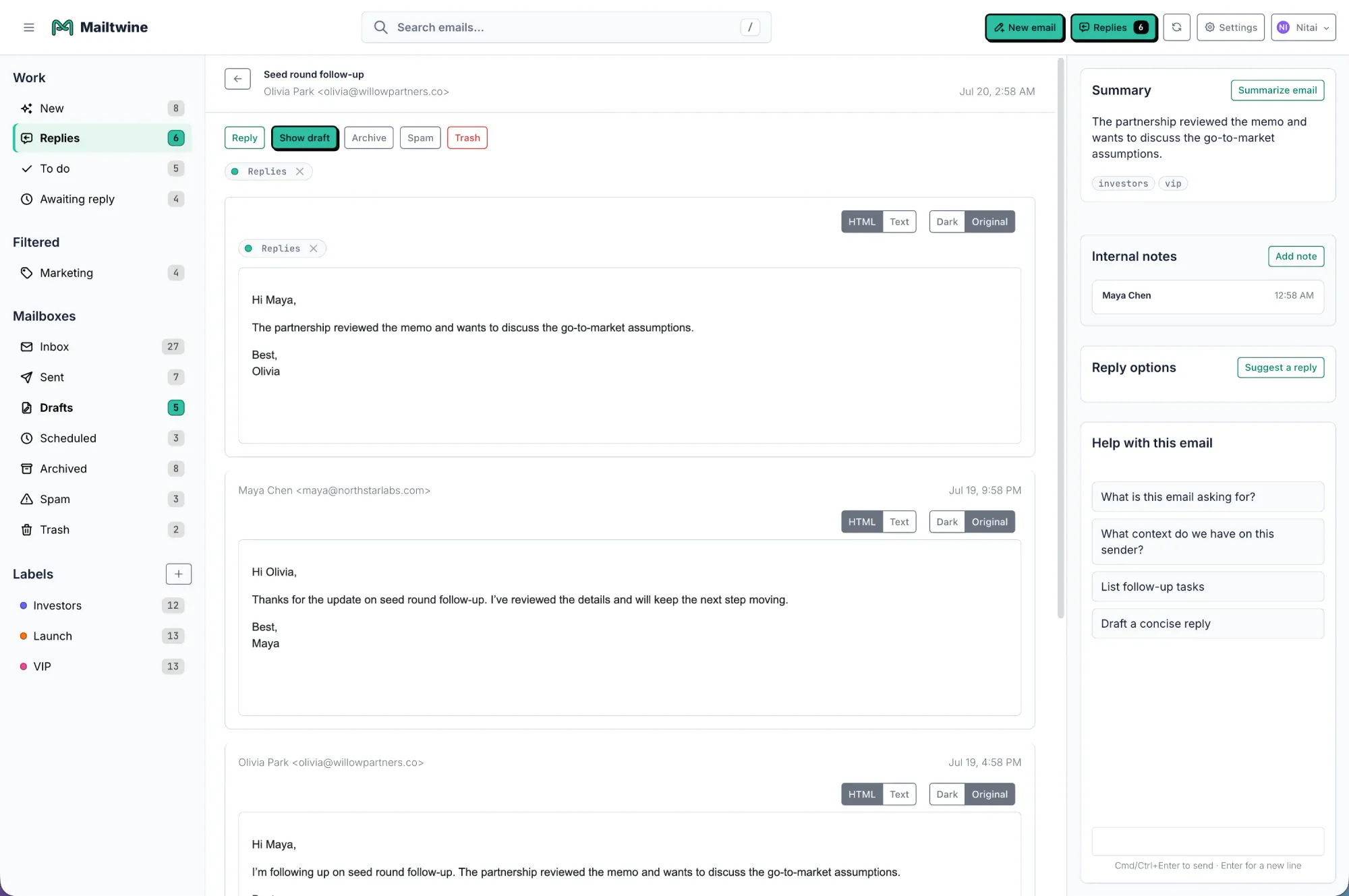
Mailtwine treats summarization as part of email triage, not a standalone trick. That is useful for teams that want to move messages into clear action, especially when the inbox is shared across support, success, sales, or operations.
If you want the broader workflow behind this, see how to triage email with AI. For the decision layer before summarization, read what is AI email triage.
What an AI email summarizer should include
A useful summary should answer five questions fast:
- What is this about?
- What is the current status?
- What needs to happen next?
- Who owns the next step?
- When does it need to happen?
If the summary only restates the thread in fewer words, it is not helping much. The point is to turn a long message chain into a workable decision.
1. Topic
The topic is the subject of the conversation in plain language. It should make the thread recognizable without reopening the whole email.
Example:
- "Customer is asking for a refund after a billing error."
- "Vendor needs confirmation on the revised launch date."
A strong topic lets the reader decide whether the thread matters to them at all.
2. Status
Status tells you where the thread stands now. Is this new, waiting on a reply, blocked, approved, escalated, or closed?
That detail matters because the same topic can need very different handling depending on the current state.
Example:
- "Waiting on finance approval."
- "Customer has responded and is asking for an updated ETA."
- "Issue is resolved, but the customer has not confirmed closure."
3. Action item
The action item is the next step that actually moves the thread forward. This is the part many summaries miss.
Instead of:
- "The team discussed the issue."
You want:
- "Send the revised timeline to the customer."
- "Confirm whether the refund can be approved."
- "Schedule a follow-up with the vendor."
If there is no action item, the summary is just a note. In a work inbox, that is not enough.
4. Owner
The owner is the person or team responsible for the next step. In a shared inbox, this is often the most important field.
Example:
- "Owner: Support"
- "Owner: Billing team"
- "Owner: Amanda to reply"
- "Owner: Operations, with legal review required"
Without ownership, summaries often create a false sense of progress. Everyone sees the issue. No one knows who should act.
5. Deadline
The deadline tells the reader how urgent the next step is.
Example:
- "Deadline: today before 3 PM"
- "Deadline: end of week"
- "Deadline: no fixed date, but customer is waiting"
Deadline is what turns a summary from informative into operational. It helps teams sort what needs immediate attention from what can wait.
Good summary examples
Here are a few examples of summaries that actually support inbox work.
Example 1: customer issue
Summary: Customer reports they were charged twice for the same invoice. Status: unresolved. Action item: verify the duplicate charge and confirm refund timing. Owner: Billing. Deadline: today.
Example 2: project coordination
Summary: The client approved the scope changes, but the launch date still needs confirmation. Status: pending. Action item: send the updated schedule and request sign-off. Owner: Account manager. Deadline: tomorrow morning.
Example 3: internal approval
Summary: Finance reviewed the purchase request and needs one more budget check before approval. Status: blocked. Action item: confirm remaining budget and respond. Owner: Finance operations. Deadline: end of day.
These summaries are short, but they still carry the information a team needs to act.
What bad AI summaries usually get wrong
Weak summaries tend to fail in predictable ways.
They compress too much
A summary that says, "The team discussed the issue and will follow up soon," is too vague to be useful.
They keep the emotion, but lose the work
Some summaries repeat the tone of the email without extracting the decision. For triage, tone is secondary. The task comes first.
They omit ownership
If the summary does not say who should act, the thread can sit untouched.
They miss deadlines or time pressure
A summary that hides urgency can cause real delays, especially in shared inboxes where several threads compete for attention.
They blur multiple threads into one point
A long conversation may contain a decision, a request, and a follow-up task. A good summarizer should separate those ideas clearly enough to scan.
How Mailtwine uses summarization in the workflow
Mailtwine is built for inboxes where summarization is one step in a larger operational flow. It connects with Helpmonks, Fastmail, IMAP, and Microsoft 365 accounts, so teams can work from the mailbox they already use.
In that setup, the summary is not just a note under the thread. It helps the system and the team decide:
- what the thread is about
- whether it needs action now
- who should own it
- whether a reply should be drafted
- whether it should be routed or approved
That is why summarization fits naturally beside triage, routing, and drafts. If you are comparing features, the broader view is in email automation for busy teams and AI for email.
When an AI email summarizer is enough, and when it is not
A summarizer is enough when the goal is simple:
- skim a long thread faster
- surface the latest update
- prepare for a reply
- review a queue with more context
It is not enough when the inbox itself needs structure.
If multiple people share ownership, you usually need more than a summary. You need:
- triage
- assignment
- routing
- approval
- escalation
- auditability
That is why a summarizer works best as part of a workflow product rather than as a standalone convenience feature. Summaries help people understand the thread. Workflow helps them move it forward.
How to write better prompts for summaries
If your summarizer supports instructions or templates, ask it to capture the fields that matter most.
A useful prompt can be as direct as:
- "Summarize this thread with topic, status, action item, owner, and deadline."
- "Return a concise summary for triage, not a full recap."
- "Highlight the next step and who owns it."
- "Call out any date or time mentioned in the thread."
You can also tailor the output to your team:
- Support: topic, customer impact, current status, owner, deadline
- Sales: lead context, decision stage, next step, owner, follow-up date
- Operations: issue, blocker, dependency, responsible team, due date
- Executive inboxes: topic, decision required, risk, owner, urgency
The best summaries are not generic. They are shaped around the decision the reader needs to make.
How summarization supports AI email triage
Summarization is useful because it reduces the cost of the first read. Triage is useful because it determines what happens after that read.
Together, they help teams answer:
- Does this need attention now?
- Who should handle it?
- What should happen next?
That is why Mailtwine treats the summarizer as a workflow step, not the whole product. A summary without routing still leaves work in limbo. A summary with triage attached becomes part of a real system.
If you want that full flow, start with how to triage email with AI, then look at email triage software for the operational side.
Frequently Asked Questions
What does an AI email summarizer do?
An AI email summarizer turns a long thread into a shorter version that highlights the main point and the next step. The best summaries do not just reduce length. They preserve the topic, current status, action item, owner, and deadline so the reader can decide what to do next.
What should an AI email summary include?
A useful AI email summary should include topic, status, action item, owner, and deadline. Those fields turn a long thread into something a person or team can act on quickly. Without them, the summary may be readable but still not useful for triage.
Is email summarization the same as email triage?
No. Summarization helps you understand the thread faster, while triage decides what to do with it. In practice, summaries often support triage by giving the reviewer enough context to prioritize, assign, or route the message.
Can an AI email summarizer help with shared inboxes?
Yes. Shared inboxes benefit from summaries because they reduce back-and-forth about what a thread means and who should handle it. The most useful summaries make ownership and urgency visible, which helps teams move faster and avoid duplicate work.
What is the difference between a summary and a draft reply?
A summary explains the thread. A draft reply is a proposed response. Many teams need both, but they serve different purposes. Summaries help with review and assignment, while drafts help with response speed after the right owner has been identified.
The bottom line
An AI email summarizer is useful when it helps people move from reading to action.
The best summaries are specific. They identify the topic, show the status, name the next action, assign an owner, and include a deadline when there is one. That is the difference between a shortened thread and a usable workflow step.
For Mailtwine, that is the point: summarization should make triage easier, not replace it.





