Best AI Email Assistants in 2026: What to Look For and Why Mailtwine Is Different

People usually ask for the “best AI email assistant” when they do not actually want another writing tool. They want an inbox that sorts itself, surfaces what matters, and turns incoming email into something they can act on quickly.
That is the category shift happening in 2026. AI now powers two related but different products: tools that help you write emails, and tools that help you manage email. The best AI email assistant for your team depends on which problem you are trying to solve.
If your inbox is the bottleneck, this guide focuses on AI email management, AI inbox management, triage, summarization, and workflow automation. It also explains where Mailtwine fits, especially for teams using Helpmonks, Fastmail, IMAP, and Microsoft 365 accounts.
What is an AI email assistant?
An AI email assistant is software that helps you handle email faster by reducing manual work. Depending on the product, it may draft replies, summarize threads, prioritize messages, label or route incoming mail, and suggest the next action.
A useful AI email assistant does not just write text. It helps you decide what to do next with each message.
Two versions of the category
The reason this space feels crowded is that “AI email assistant” now covers two different jobs:
- Writing help: generate replies, rewrite tone, and clean up drafts.
- Inbox management: triage, summarize, prioritize, and automate routing.
That difference matters. If your team already knows what to say but cannot keep up with volume, writing help will not solve the real problem. You need AI for email management.
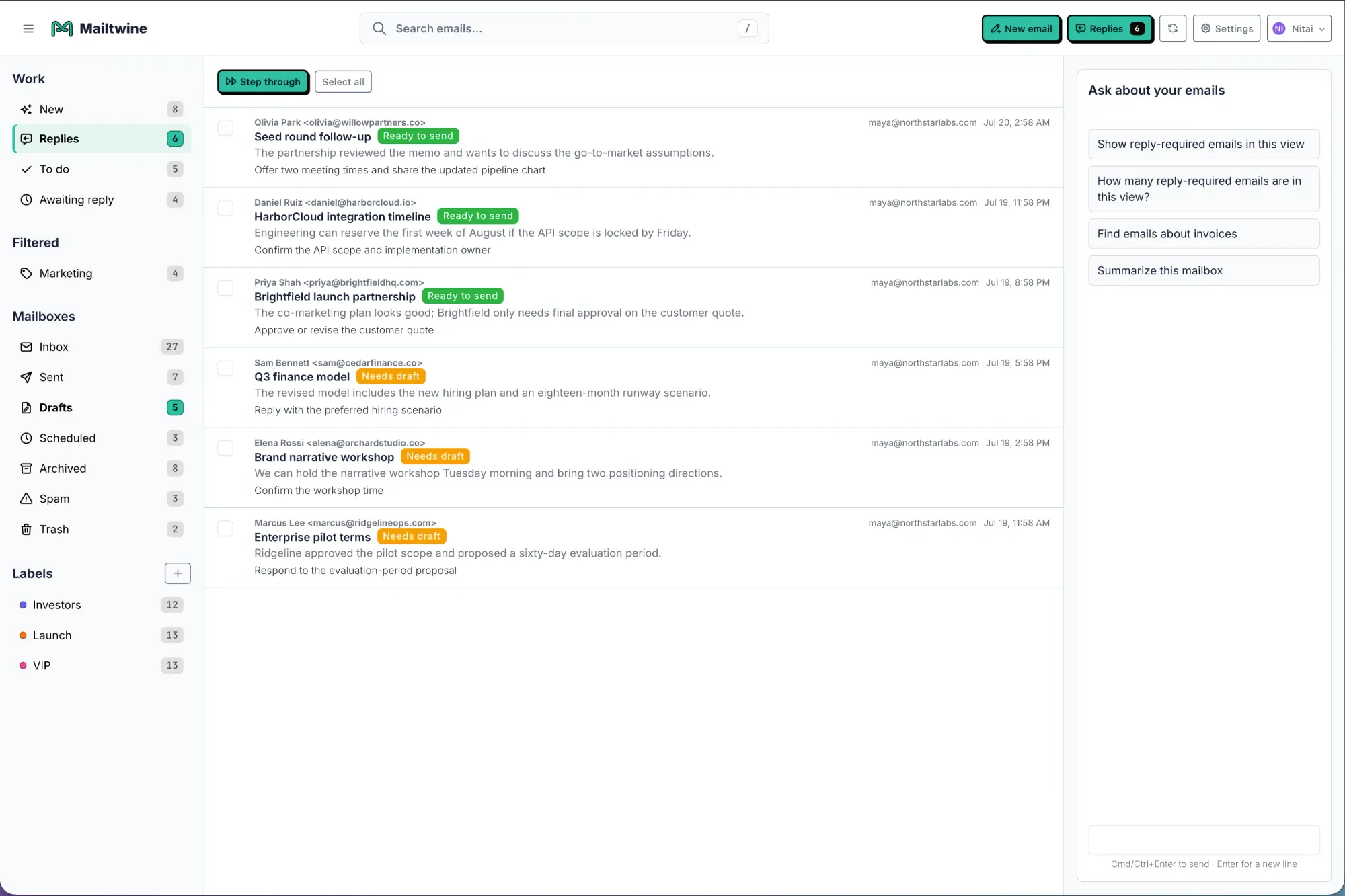
Mailtwine is built for that second job. It is a new kind of email triage software designed to automatically organize incoming mail with advanced AI features, so teams spend less time scanning inboxes and more time acting on the right messages.
How AI inbox management works
AI inbox management uses rules and models to reduce the amount of manual sorting people do each day. A strong system usually includes four pieces:
- Prioritization: identifies which emails need attention first
- Labeling or routing: sends messages to the right queue, folder, or team
- Summarization: shortens long threads into a readable overview
- Suggested actions: helps decide whether to reply, assign, archive, or follow up
What is email triage?
Email triage is the process of sorting incoming messages by urgency, topic, or owner so the right email gets handled first. With AI, triage becomes faster because the system can recognize patterns, classify messages, and move them into the right workflow automatically.
A simple example workflow looks like this:
- A new message arrives in a shared inbox
- AI detects whether it is urgent, routine, or informational
- The message is routed to the right queue or person
- The team sees a shorter, cleaner action list instead of a mixed inbox
That shift is the real value of AI email assistants for operations, support, and customer-facing teams.
How AI email summarization helps
Long threads slow people down because they force you to reread context before you can respond. An AI email summarizer condenses the thread into the key points, open questions, and next step.
This is especially useful when:
- multiple people are replying in the same thread
- a customer conversation has stretched over several days
- the inbox includes recurring operational requests
- someone returns from time off and needs a fast catch-up
Good summarization does not replace reading. It reduces the amount of reading needed before action.
Email workflow automation examples
Email workflow automation is where AI goes from helpful to operational. Instead of asking someone to sort every message by hand, the system can handle repetitive patterns automatically.
Common automation examples include:
- routing emails by topic or sender
- tagging requests for follow-up
- flagging urgent messages for immediate review
- creating reminders for unanswered threads
- suggesting standard responses for repeat questions
For busy teams, this is where the time savings compound. A few seconds saved per message becomes a major reduction in inbox load over a week.
What to look for in inbox management software
If you are comparing inbox management software or trying to choose the best AI email assistant, focus on the features that actually change daily work.
Feature checklist
- Accurate triage: can it sort messages in a way your team trusts?
- Summarization: does it make long threads easier to review?
- Workflow automation: can it route or tag emails without manual setup every time?
- Integrations: does it work with the email systems you already use?
- Team fit: does it support shared inboxes or just individual users?
- Control: can you review, override, or refine the AI’s decisions?
- Privacy and access: is the setup compatible with your internal requirements?
A tool can look impressive and still fail if it adds complexity instead of removing it.
Why Mailtwine stands out
Mailtwine is built around one goal: automatic email triage with advanced AI features. That makes it a better fit for teams that care more about inbox control than email drafting.
Mailtwine works natively with:
- Helpmonks
- Fastmail
- IMAP
- Microsoft 365 through Microsoft OAuth
That matters because inbox management only works if the tool fits the mail system your team already uses. If you need to keep your current setup and still reduce manual sorting, Mailtwine is designed for that use case.
AI email assistant Outlook support
Many people search for an AI email assistant for Outlook because they want to know whether a tool fits a Microsoft-based workflow.
If Outlook is your team’s default environment, compatibility is one of the first things to check. In practice, the key questions are:
- Does the assistant connect natively?
- Can it triage shared inboxes or only personal accounts?
- Does it support the actions your team relies on today?
- Are there limits on setup, sync, or routing rules?
Mailtwine supports Microsoft 365 accounts through Microsoft OAuth, which makes it relevant for teams that want AI-assisted inbox management inside a Microsoft workflow.
How to choose the best AI email assistant
The best AI email assistant is not the one with the most features. It is the one that matches your main inbox problem.
Choose based on this order:
- Problem type: writing, triage, summarization, or automation
- Email environment: Helpmonks, Fastmail, IMAP, Outlook, or Microsoft 365
- Team workflow: shared inbox, support queue, sales inbox, or operations inbox
- Trust level: how much control you need over AI decisions
- Speed to value: how quickly the tool reduces inbox load
If your team needs faster replies, a writing assistant may be enough. If your real issue is inbox overload, AI inbox management will deliver more value.
AI email assistant vs intelligent email assistant
People also search for “intelligent email assistant,” which is usually just another way of asking for the same thing: a tool that can understand context and reduce manual inbox work.
The phrase is useful because it points to a stronger expectation. An intelligent email assistant should do more than generate text. It should help prioritize messages, summarize threads, and support the actual workflow around email.
Best fit for Mailtwine
Mailtwine is a strong fit if your main need is:
- automatic email triage
- inbox prioritization
- AI-assisted sorting
- email workflow automation
- shared inbox management across supported providers
It is not positioned as a generic writing tool. It is built for teams that want the inbox itself to become easier to manage.
Frequently Asked Questions
What is the difference between an AI email assistant and email triage software?
An AI email assistant is a broad term for software that helps manage email, while email triage software is focused on sorting and routing incoming messages. If your main issue is inbox overload, triage software is usually the more practical category.
Does Mailtwine work with Outlook?
Mailtwine supports Helpmonks, Fastmail, and IMAP natively, and Microsoft 365 is supported through Microsoft OAuth. If Outlook is part of your workflow, Microsoft 365 compatibility is the relevant detail to watch.
What does AI inbox management do?
AI inbox management prioritizes, labels, summarizes, and routes messages so teams can handle email with less manual sorting. It reduces time spent scanning the inbox and makes it easier to focus on what needs action.
Is an AI email assistant useful for shared inboxes?
Yes. Shared inboxes often benefit the most because multiple people are sorting the same stream of messages. AI can reduce overlap, speed up triage, and help route work to the right person.
How is an intelligent email assistant different from a normal email tool?
An intelligent email assistant understands context and helps with decisions, not just message storage. It can support prioritization, summaries, and workflow automation instead of leaving everything to manual review.
The short version
If you want help writing email, look for a drafting assistant. If you want less inbox chaos, look for AI for email management.
Mailtwine is built for the second category. It helps teams triage email automatically, manage inboxes faster, and work through messages in a cleaner, more actionable way.




