What Is AI Inbox Management?

AI inbox management is software that uses AI to help teams process incoming email faster by deciding what each message needs: priority, owner, next action, and timing. Instead of making someone read, sort, and route every message by hand, the system handles the first pass and turns the inbox into a managed queue.
That matters most in shared inboxes. When support, sales, operations, or executive teams are all working from the same mailbox, email stops being a simple communication channel. It becomes a workflow surface where every message needs context before anyone can act.
Mailtwine is built for that kind of work. It connects with Helpmonks, Fastmail, IMAP, and Microsoft 365 accounts, so teams can keep the mailbox they already use while adding AI triage, routing, and approval flows on top.
AI inbox management vs. a regular inbox
A regular inbox shows messages in chronological order. That is fine for personal email, but it breaks down quickly when one mailbox serves a team.
AI inbox management does more than sort by sender or subject line. It reads the content and context of each thread, then helps answer questions like:
- Is this urgent?
- Who should own it?
- Does it need a draft, a reply, an approval, or an escalation?
- What is the next step?
- How fast does it need a response?
This is why AI inbox management is useful in operational inboxes. The tool is not just reducing clutter. It is helping teams decide what happens next.
What AI inbox management actually does
A useful AI inbox system usually handles four pieces of inbox work.
1. Prioritizes messages
Not every message deserves the same attention. AI can surface urgent customer issues, high-value leads, deadline-driven requests, and escalation language before lower-priority mail.
For teams, this helps prevent missed messages and stops important threads from sitting behind routine noise.
2. Assigns ownership
Shared inboxes often fail because everyone sees the message, but no one knows who should take it. AI inbox management can classify the message and route it to the right person or team based on topic, sender, customer status, or workflow rules.
That makes ownership visible. A message is not just "in the inbox" anymore. It belongs to someone.
3. Identifies the next action
Some emails need a reply. Others need review, approval, follow-up, a handoff, or a note to another system. AI inbox management helps expose the next step instead of forcing the reader to infer it from the thread.
That is especially useful when the thread is long or the request is buried in back-and-forth replies.
4. Supports SLA handling
In support and operations teams, speed matters. AI inbox management can help track whether a message needs immediate attention or can wait, which makes SLA-aware triage easier to maintain.
When priority, owner, and next action are clear, teams can handle response timing more consistently.
Where AI inbox management helps most
AI inbox management is most useful when email is tied to work that needs coordination, not just response. Here are the main use cases.
Shared inboxes
Shared inboxes get messy when multiple people answer the same mailbox. AI inbox management helps split the flow into owned work items instead of leaving every message available to everyone.
That is useful for:
- support@ mailboxes
- sales@ or partnerships@ inboxes
- operations or billing queues
- executive assistants and admin teams
The goal is to keep one message from being seen as "someone else's job" when it actually needs a response now.
Support queues
Support teams need fast sorting, fast ownership, and fast escalation. AI inbox management can help identify product issues, account problems, billing questions, and urgent customer requests before a human reads every line.
It also helps support leads keep queue hygiene. A message that has a clear priority, owner, and next action is easier to manage than a long list of unread mail.
Sales follow-up
Sales inboxes are full of mixed intent: new leads, inbound replies, scheduling requests, objections, and internal coordination. AI inbox management can help separate active opportunities from low-value messages and route promising threads faster.
For sales teams, the value is less about writing a clever reply and more about not letting an interested lead sit unanswered.
Operational teams
Operations, finance, recruiting, and customer success teams often work through inboxes that behave like task queues. They need messages triaged into the right bucket, then assigned to the right person with the right context attached.
AI inbox management helps these teams keep the process moving without making them rebuild their workflow elsewhere.
What good inbox management software should include
If you are evaluating inbox management software, the important question is not "Does it use AI?" The better question is "Does it help us move a message from incoming to action?"
Look for software that can do the following:
- classify messages by topic or request type
- surface urgency and priority
- assign an owner
- recommend or create the next action
- support human review where needed
- keep thread context attached to the work
- fit into your current mailbox setup
Mailtwine focuses on that operational layer. It works natively with Helpmonks, Fastmail, and IMAP, and it is moving toward Microsoft 365 Office support as well. That makes it useful for teams that want AI inbox management without changing providers or rebuilding their inbox from scratch.
Why priority, owner, next action, and SLA matter together
These four fields are what turn inbox management from "sorting emails" into "running a workflow."
- Priority tells the team what matters first
- Owner tells the team who is responsible
- Next action tells the team what to do
- SLA tells the team how quickly it needs to happen
If one of those is missing, the inbox stays vague. A message can be labeled urgent, but if nobody owns it, nothing changes. A message can be assigned, but if no next action is clear, it still takes too long to move. A message can have an owner and a task, but if response timing is not tracked, important work slips.
AI inbox management is valuable because it helps make those decisions faster and more consistently.
How Mailtwine fits this workflow
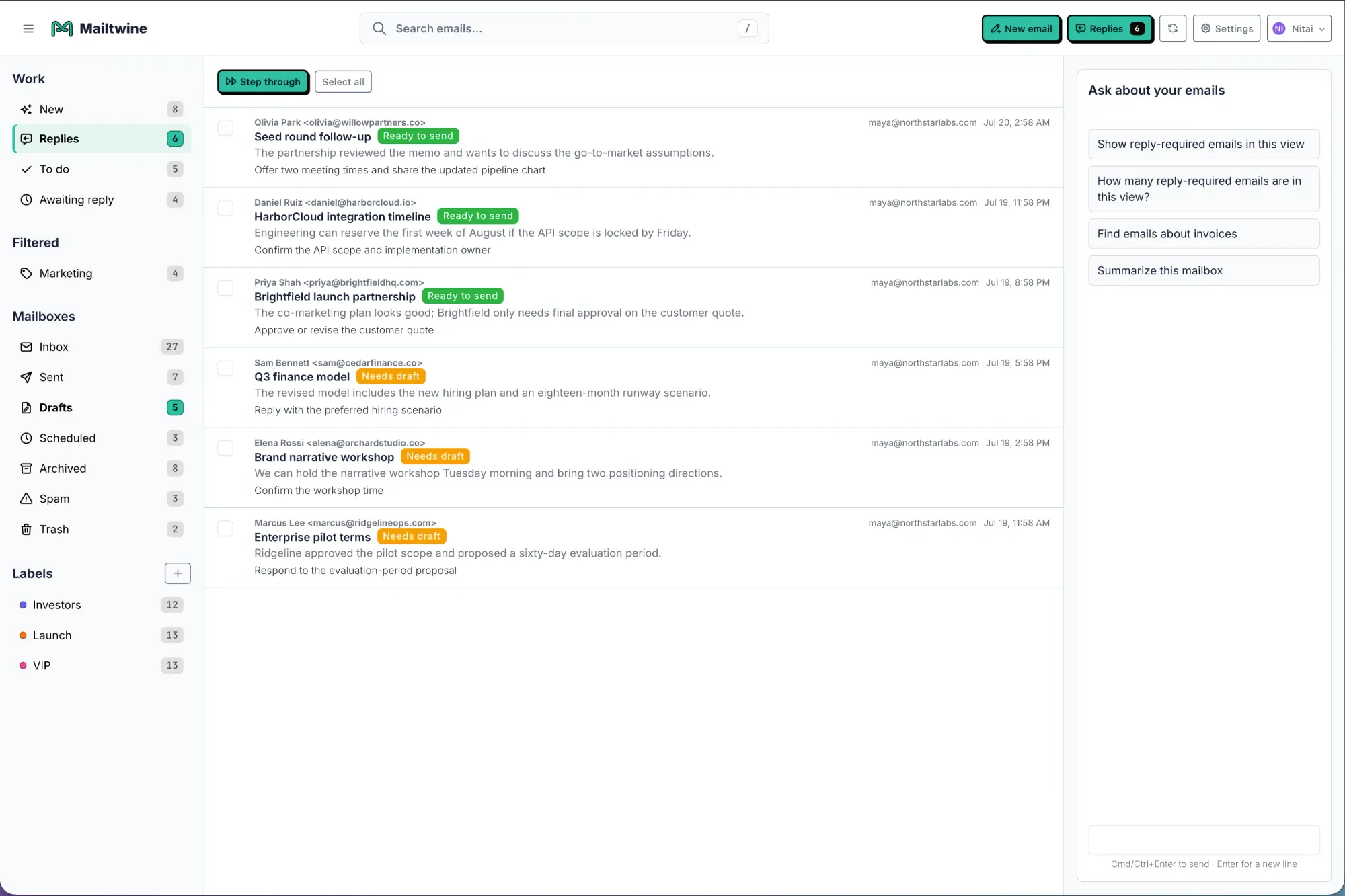
Mailtwine is an AI email triage tool designed for teams that need more than draft help. It helps classify, prioritize, route, and prepare replies while keeping the mailbox as the center of work.
That makes it a strong fit for:
- support teams that need urgent issues surfaced first
- sales teams that need lead follow-up to move quickly
- operations teams that need clear ownership
- shared inbox teams that need fewer duplicate responses
- teams that want approvals before messages go out
If you want the broader workflow behind this, see How to triage email with AI for the process level view, or read What is AI email triage? for a deeper look at the triage layer itself.
For teams comparing tools, AI Inbox Management Software Comparison: How to Choose the Right Tool for Your Team explains what to look for in routing, ownership, and mailbox fit.
When AI inbox management is the wrong fit
AI inbox management is not the best answer for every inbox.
It is less useful if:
- one person owns the mailbox and handles every message manually
- the inbox is low volume and rarely needs routing
- the main problem is writing speed, not triage
- the team does not need ownership or SLA handling
In those cases, a simple assistant may be enough. But when email is a shared work queue, inbox management software usually matters more than a drafting tool.
What to expect from the first implementation
The best first step is not full automation. It is removing repetitive triage work.
Most teams start by using AI to:
- identify incoming message type
- flag urgency or escalation
- route to the right person
- draft or prepare the response
- keep approvals in the loop when needed
That approach gives the team faster decisions without giving up control. It also reduces the chance of misclassified emails landing in the wrong place.
If you are still deciding whether you need management software or just better reply help, AI for Email: How to Use Artificial Intelligence to Manage Your Inbox is a helpful place to compare the broader category.
Frequently Asked Questions
What is AI inbox management?
AI inbox management is the use of AI to prioritize, route, summarize, and organize email work automatically. In team inboxes, it helps turn incoming messages into owned tasks with a clear next step.
How is AI inbox management different from email automation?
AI inbox management interprets message content and context, while email automation follows predefined rules or triggers. The two work well together, but AI is especially useful when the inbox needs judgment, not just filters.
Who should use inbox management software?
Inbox management software is useful for support, sales, operations, executive, and customer-facing teams that share inboxes or handle recurring request volume. It is most valuable when messages need priority, ownership, and SLA-aware handling.
Does AI inbox management replace human review?
No. The best systems reduce manual sorting and help teams act faster, but people still review sensitive replies, exceptions, and customer commitments. That is especially important in support and operational workflows.
What should AI inbox management software track?
At minimum, it should help track priority, owner, next action, and response timing. Those four pieces keep the inbox from becoming an unread pile and make the queue easier to manage.
AI inbox management works best when it makes email feel like a queue with clear next steps, not a stream of interruptions. For teams that need that structure, Mailtwine is built to help the inbox behave more like an operator than a mailbox.





