AI Email Assistant for Outlook: how it helps teams

An AI email assistant for Outlook helps teams process incoming mail faster by prioritizing messages, drafting replies, and routing important threads to the right people. Instead of treating every message the same, it turns a crowded inbox into a clear action queue so teams can respond in order of urgency.
Mailtwine helps teams triage email across Helpmonks, Fastmail, and IMAP, and supports Outlook.com and Microsoft 365 through Microsoft OAuth. Outlook teams can connect their existing accounts and test how prioritization, summaries, and review fit their daily work.
What is an AI email assistant for Outlook?
An AI email assistant for Outlook is software that helps sort, summarize, and respond to email inside or alongside an Outlook-based workflow. The best tools do more than write text. They help teams decide what needs attention now, what can wait, and what should be handed off automatically.
For busy inboxes, that usually means three things:
- ranking messages by importance
- suggesting reply drafts or response actions
- routing threads to the right inbox, queue, or teammate
That matters because Outlook is often where sales, support, ops, and leadership teams spend a large part of the day. If the inbox stays full of low-value interruptions, people end up re-reading the same threads, missing urgent items, and falling behind on follow-ups.
Why Outlook users need AI triage, not just email writing help
A lot of "AI email" tools focus on drafting a better message. That is useful, but it solves only part of the problem.
Most teams do not struggle to write every email from scratch. They struggle to:
- notice which messages need a quick reply
- identify the threads that should be escalated
- separate routine requests from high-priority items
- keep shared inboxes from becoming bottlenecks
That is where AI triage is more useful than a plain writing assistant. It helps your team handle the inbox as a workflow, not just a text editor.
Mailtwine is designed around that workflow. It automatically triages email so teams can move faster, reduce inbox noise, and keep important conversations from getting buried.
If you want a broader explanation of the workflow behind this, see what AI email triage is and how to triage email with AI.
AI email assistant for Outlook: how it helps teams
The most useful Outlook triage workflows are practical and repetitive. Teams need fewer missed messages, clear ownership, and faster decisions.
1. Prioritizing important messages
An AI assistant can analyze incoming mail and surface the threads most likely to need immediate attention. That helps people focus on customers, prospects, or internal issues that should not sit in the queue.
In a shared Outlook inbox, this is especially useful when the volume is uneven. One morning may bring three urgent requests and thirty routine updates. AI triage helps separate the signal from the noise.
2. Suggesting reply drafts
For common questions, an AI assistant can suggest a reply instead of forcing someone to start from a blank page. This saves time on repetitive responses and keeps tone more consistent across the team.
The real value here is speed. When a message only needs a short acknowledgment, a status update, or a standard answer, the assistant removes the friction that slows down response times.
3. Routing threads to the right person or queue
Outlook inboxes often become catch-alls. Sales, support, billing, and ops messages all land in the same place. An AI email assistant can help route threads based on topic, urgency, or ownership.
That matters for team inboxes because the first person to see a message is not always the right person to handle it. Routing turns inbox management into a process, not a guessing game.
4. Keeping shared inboxes organized
Shared inboxes work best when every message has a clear next step. AI can help move threads into categories such as needs reply, waiting on customer, internal follow-up, or resolved.
Mailtwine focuses on this kind of inbox management. If your team needs a faster way to turn incoming mail into action, see AI inbox management software and AI inbox management software comparison.
What Mailtwine does for email triage
Mailtwine helps teams triage emails automatically with advanced AI features. The product is built to reduce manual sorting and make the inbox easier to work from day to day.
For teams using Mailtwine today, the flow is straightforward:
- Mail arrives in the connected inbox.
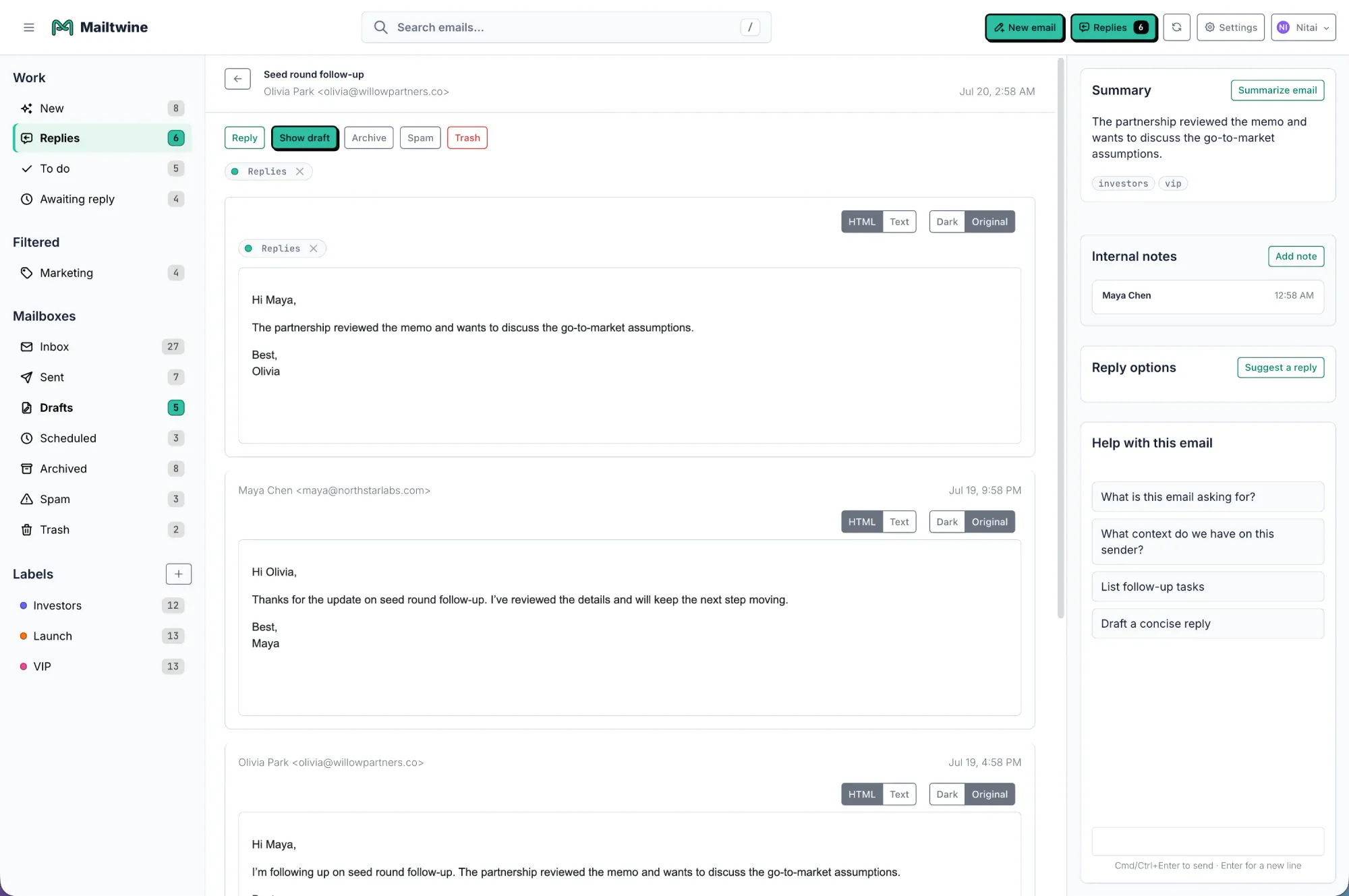
- Mailtwine analyzes the message and its context.
- Important threads are prioritized.
- Routine messages can be grouped, routed, or handled more efficiently.
- The team works from a clearer queue instead of a crowded inbox.
Mailtwine supports Outlook.com and Microsoft 365 through Microsoft OAuth, alongside Helpmonks, Fastmail, and standard IMAP. The browser extension provides another way to work with thread context and suggestions alongside Outlook on the web.
If you are trying to decide whether email triage or broader email management is the better fit, these guides help clarify the difference:
- What is email triage?
- AI email management: turn a busy inbox into a clear action queue
- Email automation for busy teams: what it is and how it works
How teams should think about Outlook integration
If your team uses Outlook, the integration question is not just "does it connect?" It is "does it fit the way we already work?"
A good Outlook AI assistant should support the way teams already handle email:
- shared inboxes for support or operations
- personal inboxes with high message volume
- routing rules based on team ownership
- repeatable response patterns
- fast handoff when a thread needs escalation
Review the Outlook integration guide before rollout. Check account permissions, mailbox access, and the review steps your team needs for replies and routing.
Mailtwine users can connect Microsoft accounts through Microsoft OAuth. Teams using other providers can also connect Helpmonks, Fastmail, or standard IMAP mailboxes.
What to look for in an AI email assistant for Outlook
Not every tool labeled "AI assistant" will actually improve inbox operations. Before choosing one, check for these features.
Clear prioritization logic
The assistant should help users understand why a thread matters. Good prioritization is not just a badge or color tag. It should reflect urgency, sender importance, thread history, or topic.
Useful reply suggestions
Drafting help should fit common business emails, not just generic phrasing. The assistant should reduce response time without making replies sound robotic.
Shared inbox support
If multiple people work from the same Outlook mailbox, the tool should help with routing and ownership. That is where AI can remove the most friction.
Workflow fit
A strong assistant should support existing processes, not force the team to rebuild everything. If your team already uses inbox queues, delegation, or service categories, the AI should make those workflows faster.
Native or reliable integration path
For Outlook users, integration matters. If the tool is native, that is ideal. If not, check whether it supports the mailbox structure you rely on through IMAP or another path.
How Outlook teams can start with a focused pilot
If your team uses Microsoft 365, start by connecting one account through Microsoft OAuth and choosing a representative set of incoming requests.
Check whether priorities are useful, summaries preserve the important details, and assignments reach the right people. Keep replies under review while the team evaluates the workflow.
Mailtwine also supports Helpmonks, Fastmail, and IMAP, so teams with several providers can evaluate inbox handling across the mailboxes they already use.
A simple evaluation checklist
Use this quick checklist if you are comparing options:
- Does it prioritize messages, not just draft them?
- Does it help with shared inbox workflows?
- Can it route threads to the right person or queue?
- Does it reduce repeat work on common replies?
- Does it fit your current email setup?
- Is Outlook support live now, or still planned?
If a tool only helps write emails, it may save a little time. If it helps triage, route, and organize the inbox, it can change how the team works every day.
The bottom line
An AI email assistant for Outlook should do more than speed up writing. It should help teams sort incoming messages, surface what matters most, and route threads with less manual effort.
Mailtwine supports this triage workflow across Helpmonks, Fastmail, and IMAP, as well as Outlook.com and Microsoft 365 through Microsoft OAuth. Teams can evaluate whether that workflow turns their inbox into a clearer action queue.
Frequently Asked Questions
Does Mailtwine work with Outlook right now?
Yes. Mailtwine supports Outlook.com and Microsoft 365 through Microsoft OAuth. It also works with Helpmonks, Fastmail, and IMAP. Review the Outlook setup guide and test the account permissions your team needs before a wider rollout.
What is the difference between an AI email assistant and AI email triage?
An AI email assistant may help write replies, summarize threads, or suggest actions. AI email triage focuses on sorting and routing messages so teams can decide what to handle first. Triage is usually the better fit for shared inboxes and high-volume teams.
Is an AI email assistant useful for shared Outlook inboxes?
Yes. Shared inboxes benefit most from prioritization, routing, and repeatable handling rules. An AI assistant can reduce back-and-forth about who should answer what and help the team stay on top of urgent threads.




