AI Email Assistant: What It Should Do for a Team Inbox

A useful AI email assistant should do more than help you write replies. For a team inbox, it should help you decide what to answer, archive, assign, or defer. That is the difference between a drafting tool and a workflow tool.
Mailtwine is built for the second case. It is an AI email triage system for teams that need to sort incoming mail, keep ownership clear, and move work forward without losing human review. It works with Helpmonks, Fastmail, IMAP, and Microsoft 365, so teams can improve inbox handling without changing their mailbox setup.
What is an AI email assistant?
An AI email assistant is software that helps manage email with AI. In a simple personal inbox, that might mean drafting a response or summarizing a thread. In a team inbox, it usually needs to do more: recognize intent, prioritize messages, route them to the right person, and support approvals before anything is sent.
That broader definition matters because many buyers searching for "AI email assistant" are not just looking for reply help. They are looking for a way to reduce inbox noise and make the next action obvious.
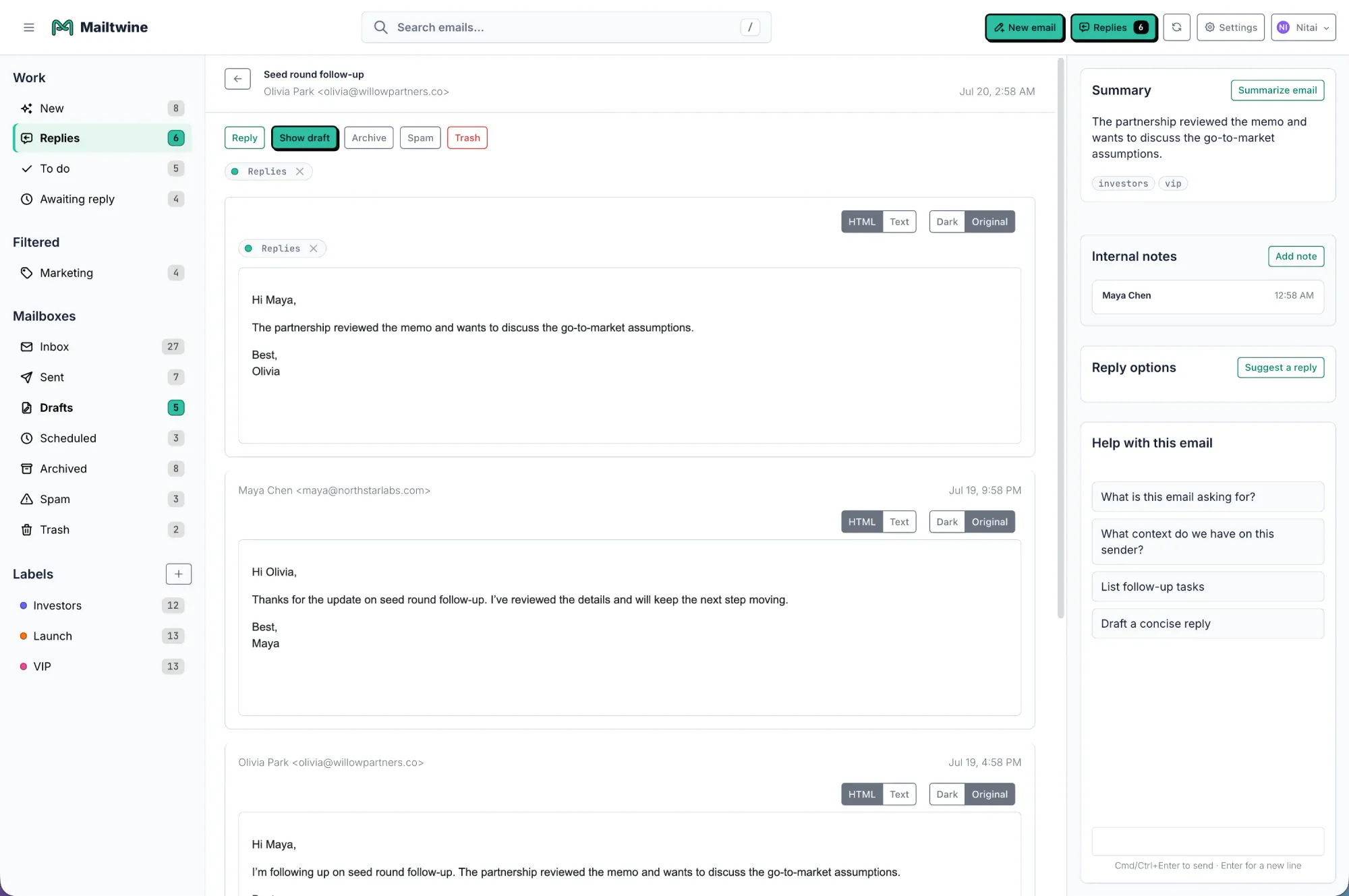
Mailtwine fits that need by turning an inbox into an action queue. It helps teams:
- prioritize what needs attention first
- summarize long threads into usable context
- assign or route messages to the right owner
- draft replies for review
- keep approval and audit history attached to the thread
If you want the operational side of that workflow, start with what AI email triage is and how to triage email with AI.
AI email assistant vs AI email triage
These terms overlap, but they are not the same.
| Feature | AI email assistant | AI email triage |
|---|---|---|
| Main job | Help with reading, drafting, and replying | Help decide what to do with each message |
| Best for | Faster response writing | Shared inboxes and operational queues |
| Core output | Suggestions | Priority, owner, next action |
| Human review | Often optional | Usually central to the workflow |
A basic assistant can make writing faster. AI triage makes the inbox more manageable. For teams, that distinction matters because the bottleneck is often not typing speed. It is deciding what deserves attention, who owns it, and whether it should be answered now, assigned, or deferred.
That is why Mailtwine is positioned around email triage software and email command center workflows, not just reply generation.
What a good team assistant should handle
A strong AI email assistant for teams should support the full loop, not just one step.
1. Prioritization
The assistant should recognize urgency, customer impact, deadlines, and repeat contacts. It should surface the important thread without making users scan every message manually.
2. Routing and assignment
If more than one person owns the inbox, messages need to land with the right person. Routing should be based on intent, topic, account, or team ownership, not just sender rules.
3. Summarization with context
Summaries are only useful when they preserve the next decision. A good summary should include the topic, current status, key details, owner, and deadline. That is why AI email summarization works best as part of a broader triage system.
4. Drafting for review
Draft help is useful, but it should stay tied to the thread. Teams need grounded reply suggestions that reflect the actual conversation, not generic text.
5. Approvals and human control
For shared inboxes, legal, support, sales, and operations teams often need review before sending. Mailtwine is built around that control layer, with default draft-and-route behavior and optional automation.
AI email assistant vs email automation
This is another comparison worth making clear.
| Feature | AI email assistant | Email automation |
|---|---|---|
| Trigger | Understands message content | Follows predefined rules |
| Best at | Interpreting intent and helping decisions | Repeating known actions |
| Flexibility | Handles messy, variable messages | Works best with consistent inputs |
| Team use | Shared inbox triage and reply support | Reminders, routing rules, follow-up steps |
Email automation is useful when the workflow is predictable. AI is better when messages arrive in different formats, with different wording, but still require the same kind of decision.
Mailtwine combines both. It uses AI to interpret the message, then applies workflow logic for assignment, review, and follow-up. If you want that full operational model, see email automation for busy teams.
Why teams look for the "best AI email assistant"
The phrase "best AI email assistant" usually signals buying intent, but "best" depends on the job.
If a person only wants faster drafting, a lightweight assistant may be enough. If a team needs ownership, approvals, routing, and a thread history, the bar is much higher. In that case, the best tool is the one that fits the inbox workflow instead of forcing the team to adapt to the tool.
When you evaluate options, look for these criteria:
- Does it help decide priority, not just write replies?
- Can it assign or route messages to the right owner?
- Does it keep summaries, drafts, and decisions attached to the thread?
- Can people approve sensitive replies before sending?
- Does it work with the mailbox you already use?
Mailtwine is designed for that kind of evaluation. Compare it with other tools on the Mailtwine compare page or read the AI inbox management software comparison.
How Mailtwine works as an AI email assistant
Mailtwine is an AI email triage system that helps teams move from inbox chaos to a clear action queue.
It helps you:
- identify what needs attention first
- decide whether to answer, archive, assign, or defer
- route work to the right person
- create draft replies for review
- preserve control through approvals
That makes it more than an assistant in the drafting sense. It is closer to an inbox operating layer. For teams, that means less manual scanning and fewer dropped messages.
Mailtwine currently works with Helpmonks, Fastmail, IMAP, and other mailbox setups, so adoption can happen without a full migration. It is also moving toward Microsoft 365 support, which makes the Outlook use case especially relevant.
If Outlook is your main mailbox, read AI email assistant for Outlook and AI email triage for Outlook and Microsoft 365.
AI email assistant Outlook use case
Outlook buyers usually want two things at once: better email handling and a setup that fits Microsoft 365 reality.
The Outlook-specific pages on Mailtwine address exactly that. The product does not ask teams to rebuild their workflow from scratch. Instead, it focuses on:
- triaging messages before they become backlog
- drafting replies for human review
- keeping approvals visible
- supporting the mailbox already in use
Outlook and Microsoft 365 FAQ topics worth answering
If you are updating Outlook content, these are the long-tail questions to cover:
- Do I need an Outlook add-in?
- Does it work with Outlook desktop?
- Can an admin approve OAuth access for Microsoft 365?
- Does Mailtwine send without approval?
- How does routing work for shared inboxes?
Those questions already belong on the Outlook and Gmail pages, not in a separate duplicate article. The goal is to make one page the clearest answer for the Outlook intent and link it back to the core triage workflow.
A simple way to think about the workflow
The right AI email assistant should help with this sequence:
- Read less manually: Use AI to surface intent, urgency, and likely ownership.
- Decide faster: Choose answer, archive, assign, or defer based on context.
- Keep work moving: Route the thread, draft the reply, and request approval if needed.
That is the practical difference between a tool that helps you write and a tool that helps a team operate.
What to look for on the product page
If you are describing Mailtwine on the homepage or product pages, keep the language direct. A strong product summary would say:
"Mailtwine is an AI email assistant that helps you decide what to answer, archive, assign, or defer."
That single sentence covers the commercial query behind "ai email assistant" and "email assistant ai" without splitting the topic into a dozen overlapping pages. It also points to the operational value instead of implying the product only drafts replies.
You can support that positioning with internal links to:
- email triage software
- what is AI email triage
- email command center
- AI inbox management software comparison
- compare Mailtwine
Frequently asked questions
What is the difference between an AI email assistant and an AI email triage tool?
An AI email assistant usually helps with drafting, summarizing, or sorting email. An AI email triage tool focuses on deciding what to do with each message, including priority, routing, assignment, and follow-up. For team inboxes, triage is usually the more complete operational layer.
Is email automation the same as an AI email assistant?
No. Email automation follows rules and triggers, while an AI email assistant interprets message context. In practice, the best team workflows use both: AI helps understand the message, and automation applies the next step.
What makes an AI email assistant useful for Outlook teams?
It should support the Microsoft 365 mailbox setup your team already uses, help with approvals, and reduce manual inbox sorting. Outlook teams usually need more than drafting help. They need routing, visibility, and control.
Should I create separate pages for "email assistant AI" and "intelligent email assistant"?
Usually no. Those are synonym variants of the same intent. It is better to cover them naturally in one canonical page and reinforce the term with clear wording in the homepage, product pages, and FAQs.
What should a good AI email summary include?
A useful summary should include the main topic, current status, key decisions, action items, owners, and deadlines. If it does not help the next person act, it is just a shorter version of the thread.
The bottom line
If a buyer searches for "AI email assistant," they are usually asking for one of two things: faster replies or less inbox chaos. Mailtwine is aimed at the second problem, while still helping with the first.
For teams, the strongest assistant is the one that makes the inbox easier to operate. That means deciding what to answer, archive, assign, or defer, then keeping the work moving with routing, summaries, and approvals.




