AI Email Management: What It Is and How Teams Use It

AI email management is the use of software to help a team handle email as a workflow, not just a list of messages. Instead of asking people to scan every inbox line by line, it helps prioritize, summarize, route, draft, and approve work so the right message gets to the right person faster.
For teams, that matters because email is rarely just communication. It is usually a queue of tasks, questions, escalations, approvals, and follow-ups. Mailtwine is built for that reality. It helps companies triage email automatically across Helpmonks, Fastmail, IMAP, and Microsoft 365, so the mailbox becomes a managed system rather than a place where work piles up.
What is AI email management?
AI email management is software that uses artificial intelligence to interpret incoming mail and move it through the next step of work. That can include identifying urgency, grouping similar requests, summarizing long threads, drafting replies for review, routing messages to the right owner, and keeping approvals visible.
A useful way to think about it is this:
- Filtering removes or hides mail based on rules.
- Triage decides what needs attention first.
- Management handles the broader workflow around the message, including ownership, routing, drafting, approval, and follow-up.
That last layer is where AI email management becomes valuable for teams. A shared inbox is rarely solved by faster typing alone. The real bottleneck is deciding what each message means, who should own it, and what should happen next.
How AI email management works
Most AI email management tools follow a simple operational sequence.
- Classify the message: The system looks at the sender, thread history, wording, and context to decide what kind of request it is.
- Prioritize the thread: It flags what looks urgent, time-sensitive, customer-facing, or high-value.
- Summarize the thread: Long conversations get condensed into a short version with the key facts and the next step.
- Route or assign ownership: The message goes to the person or team that should handle it.
- Draft a response: AI can prepare a reply, but many teams keep human review in place.
- Approve and track: The best systems keep a record of what happened, so teams can see the state of the thread and what was done.
Mailtwine follows that workflow inside the mailbox. It is not trying to replace the inbox. It is trying to make inbox work visible and manageable.
AI email management vs AI email assistant
People often use these terms interchangeably, but they are not the same.
An AI email assistant usually helps with one part of the job, often drafting or summarizing. It is useful when one person wants help writing or reading faster.
AI email management is broader. It focuses on the full inbox workflow: triage, routing, drafting, approvals, and ownership across a team.
That difference matters if your inbox is shared. A solo assistant can help one user move faster. A management system helps a team avoid duplicate replies, missed requests, and unclear ownership.
If you are deciding between the two, ask a simple question: do you need help writing emails, or do you need help running the inbox?
The four core use cases
Most teams adopt AI email management for four reasons.
1. Triage
Triage is the first pass. It is how you figure out what deserves attention now, what can wait, and what should go to someone else.
If your team spends too much time opening messages just to decide whether they matter, AI triage is the fastest place to start. Mailtwine is designed around this step, which is why we often describe it as AI email triage software first and email management software second.
For a deeper look at this workflow, see how to triage email with AI.
2. Drafting
AI can draft replies based on the content of the thread and the context it has available. For teams, the important detail is not whether AI can write quickly. It is whether the draft is grounded in the right thread and easy for a human to review.
Mailtwine uses drafting as part of the workflow, not as a standalone writing toy. That keeps the team in control of sensitive replies, customer commitments, and edge cases.
3. Routing
Routing is where email management becomes operational. Instead of leaving every message in one shared pile, the system sends it to the person or queue that should handle it.
That can reduce duplicate effort in support, success, sales, operations, or executive inboxes. It also helps teams keep work moving when more than one person shares responsibility for the same mailbox.
4. Approvals
Some replies should not go out automatically. They need review, context, or sign-off. AI email management works best when it supports that judgment instead of trying to remove it.
Mailtwine is built with draft-and-route behavior so teams can keep human approval in the loop. That makes it more useful for operational inboxes where accuracy and accountability matter.
How AI inbox management works in practice
AI inbox management is the operational version of the same idea. It means using AI to prioritize, draft, route, and defer email work automatically so the team spends less time sorting and more time resolving.
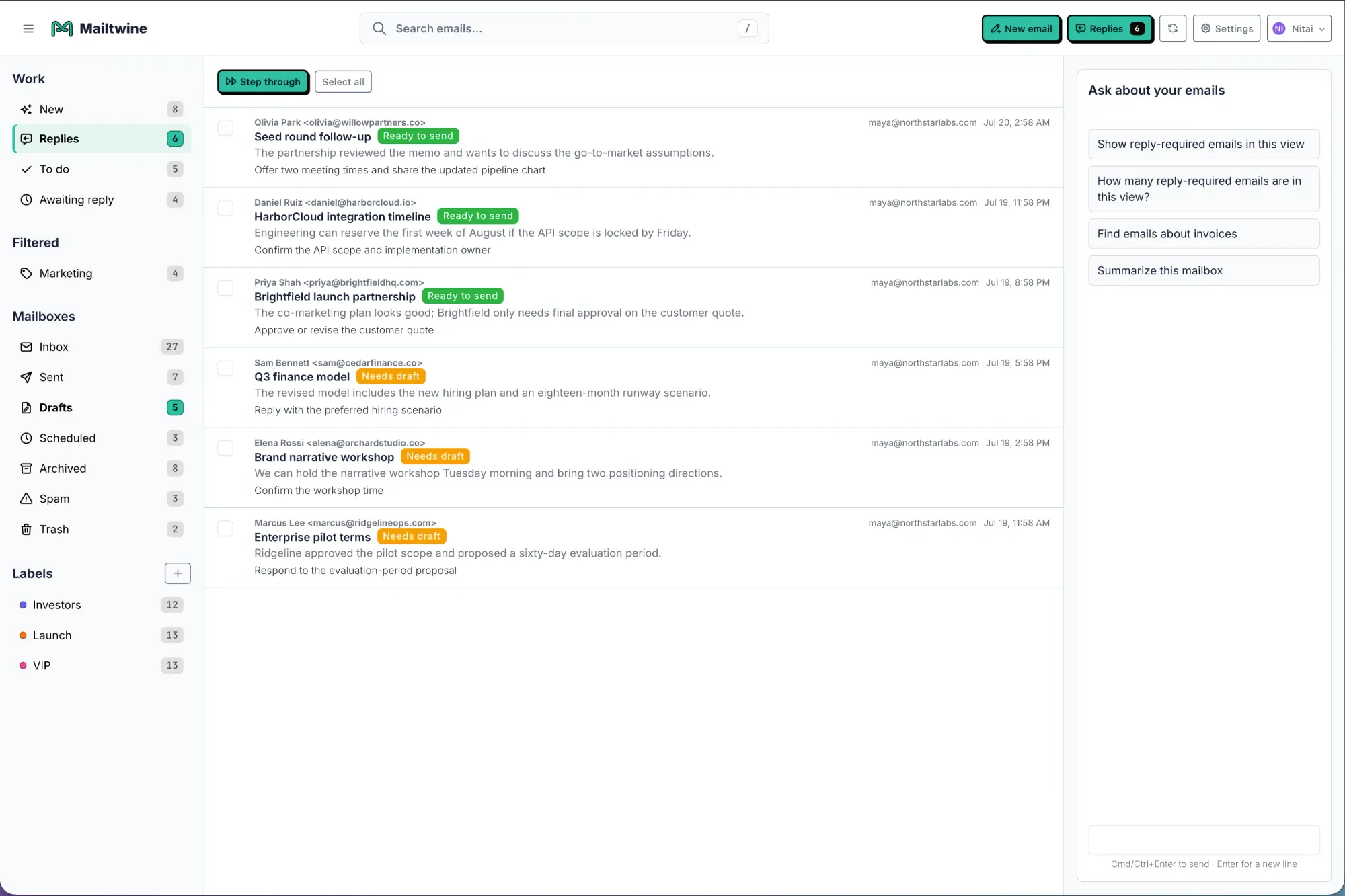
A typical workflow looks like this:
- An email arrives.
- The system identifies the topic and urgency.
- A summary appears if the thread is long.
- The message is assigned or routed.
- A draft may be prepared.
- A human approves, edits, or escalates.
This is why AI email management is useful in shared inboxes. It gives each thread a next action. Without that, inbox work often becomes a cycle of rereading, forwarding, and second-guessing.
If you want the category-level explanation, see What is AI email triage? and AI inbox management software comparison.
How summarization supports triage
Summaries are most valuable when they lead to action. A good AI email summarizer should not just shorten the thread. It should surface the current status, the key decision, the owner, and the next step.
That is why summarization belongs inside the triage flow.
For example, a long customer thread might include a billing issue, a product question, and a follow-up from support. A strong summary makes it obvious which part needs attention first and who should respond. That saves time at the point of review and reduces the chance that important context gets lost.
Mailtwine treats summarization as part of email management, not as a separate feature. If you want the deeper breakdown, read AI email summarization: how to turn long threads into clear action items.
What makes AI email management useful for teams
Not every inbox tool solves the same problem. For teams, the useful features are the ones that reduce manual work without removing accountability.
Look for these capabilities:
- Ownership: Every message has a clear owner or queue.
- Prioritization: Urgent work rises first.
- Routing: Messages go to the right person or team.
- Approval controls: Drafts can be reviewed before sending.
- Audit history: The team can see what happened to the thread.
- Mailbox flexibility: The tool works with your current setup instead of forcing a migration.
Mailtwine is focused on that operational layer. It works with Helpmonks, Fastmail, and standard IMAP today, and Microsoft 365 support is part of the roadmap. That makes it a better fit for teams that need structure inside the mailbox they already use.
AI email management for Outlook and Microsoft 365
Outlook users often search for an AI email assistant, but the real need is usually broader than drafting help. Teams want prioritization, routing, summaries, and approval-based workflow inside Microsoft 365.
That is why the Outlook angle matters. An Outlook-focused assistant should understand the mailbox context, not just generate text. It should help a team handle the first pass of work and keep important messages from getting buried.
Mailtwine's Outlook-specific direction is built around that idea. It is designed to support Microsoft 365 workflows, not just provide a generic assistant layer. If that is your use case, read AI email assistant for Outlook: what it does and how Mailtwine fits and AI email triage for Outlook and Microsoft 365.
How to tell if you need AI email management
You probably need this category of tool if any of these sound familiar:
- Your team rereads the same inbox messages multiple times before acting.
- Messages get forwarded around because ownership is unclear.
- Long threads take too long to understand.
- Important mail is missed because everything looks equally urgent.
- Drafts are easy, but deciding who should answer is the hard part.
- Shared inboxes create duplicate work or slow handoffs.
If the problem is only writing faster, a basic assistant may be enough. If the problem is keeping the inbox moving, AI email management is the better fit.
Mailtwine's approach
Mailtwine is built for teams that want to turn email into a managed queue.
It helps with:
- triage
- prioritization
- summarization
- routing
- drafting
- approvals
It also works natively with the mailbox instead of asking teams to move everything into a new system. That matters because adoption is easier when the workflow stays close to where the work already happens.
If you are comparing tools, start with Compare Mailtwine and then look at Email triage software that works your inbox like an operator. For a broader product overview, the homepage and features pages show how the workflow fits together.
Frequently Asked Questions
What is AI email management used for?
AI email management is used to prioritize messages, reduce manual sorting, summarize long threads, route work to the right person, and help teams respond faster. It is especially useful in shared inboxes where ownership and timing matter.
Is AI email management the same as an AI email assistant?
No. An AI email assistant usually helps with one task, like drafting or summarizing. AI email management covers the full workflow, including triage, routing, approvals, and thread ownership.
What is the difference between email automation and AI email management?
Email automation follows rules and triggers. AI email management interprets message context and then applies the next step. Many teams use both together, but AI adds judgment that simple rules cannot handle well.
Does AI email management work with Outlook?
Yes, if the product supports Microsoft 365 or Outlook connections. Mailtwine is building for Outlook and Microsoft 365 use cases, with workflow support centered on triage, routing, drafts, and approvals.
What is the best use case to start with?
Triage is usually the best starting point. If a team can reduce the time spent sorting and routing messages, it often sees value before adding more advanced workflow automation.
AI email management is most useful when the inbox is already part of the job. The goal is not to hide email or replace human judgment. The goal is to make sure every message has a clear next step, a visible owner, and a faster path to resolution.





