New in Mailtwine: CLI and TUI
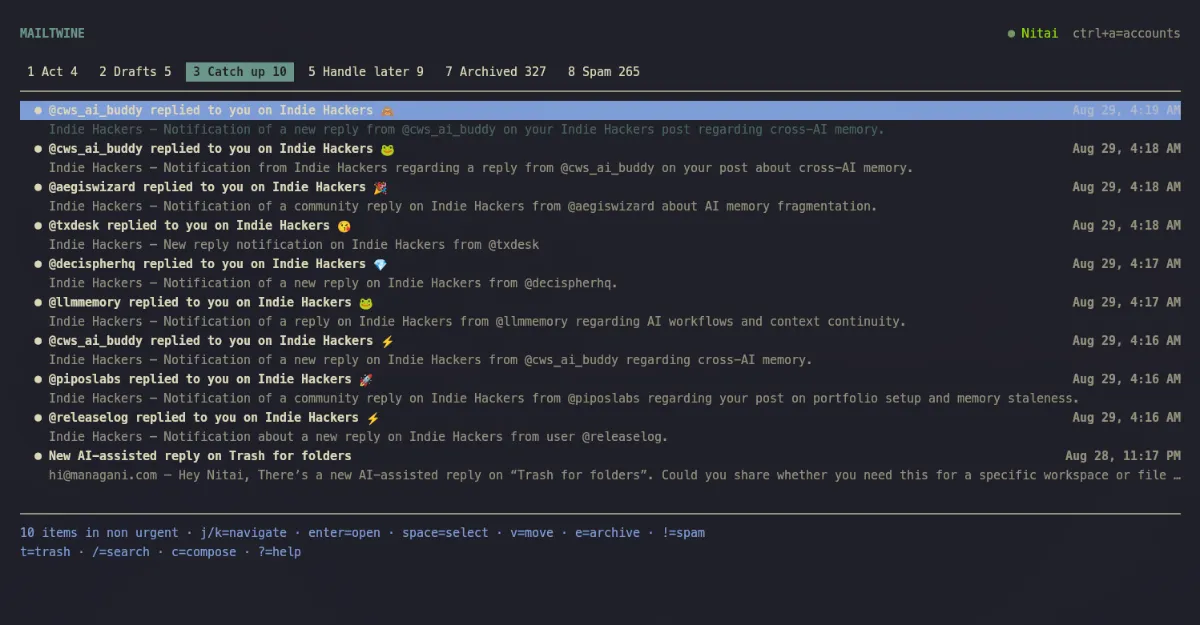
The new Mailtwine CLI makes email scriptable, composable, and agent-ready. And for people who live in the terminal, it includes a complete keyboard-first mail client.
Most email tools begin and end in the browser. But email work rarely does. It begins in deployment logs, support workflows, scripts, CI jobs, and conversations with coding agents. Moving that work into a browser, finding the right message, and copying information back creates friction and makes reliable automation difficult.
That is why we built the Mailtwine CLI.
Bring email into your workflows
The CLI gives people, scripts, and agents direct access to Mailtwine from the command line.
You can search and read email, summarize threads, triage messages, organize your inbox, create replies, manage drafts and follow-ups, schedule delivery, and inspect synchronization—all without opening another application.
mailtwine-cli emails summarize EMAIL_ID
mailtwine-cli follow-ups list
Mailtwine CLI currently provides 45 friendly commands, plus direct access to the complete Mailtwine tool catalog.
Designed for automation
Compact JSON is the default output, making commands easy to pipe into jq, shell scripts, scheduled jobs, or CI workflows.
This means Mailtwine can become part of a larger process instead of being an isolated destination. A script can find failed-payment messages. An agent can summarize a customer thread. An internal workflow can prepare a draft for review.
The CLI also includes deliberate safety defaults:
- Credentials come from environment variables, never command arguments.
- Destructive and sending actions require explicit confirmation.
- Multiple Mailtwine accounts and self-hosted servers are supported.
- Live command schemas keep help and available options aligned with the server.
The goal is simple: make email programmable without giving up control.
A complete terminal inbox, too
Automation is only half the story. The same package includes mailtwine-tui, a full-screen, keyboard-first Mailtwine client for macOS and Linux.
The TUI lets you move through Act, Drafts, Catch up, Promotions, Handle later, Waiting on others, Archived, Spam, and Trash without leaving your terminal.
You can search, read threads, switch accounts, compose in Markdown, manage attachments, ask AI for writing help, add notes, schedule messages, and set follow-ups. Real-time updates keep the inbox current while preserving your position and open work.
Authentication happens through your browser, with account credentials stored in your operating system's keyring.
Get started
Mailtwine CLI 0.2.0 is available now and requires Node.js 24 or newer.
Install it with: npm install --global @mailtwine/cli
Use the CLI with: mailtwine-cli
To get an overview of all the available commands, read the Mailtwine CLI documentation or issue the "--help" command in the terminal: mailtwine-cli --help
Use the CLI when you want Mailtwine inside scripts, automations, or agent workflows. Open the TUI when you want to work through email yourself without leaving the terminal.
Meet Mailtwine: Emails already handled
Mailtwine is the underdog operating behind the accounts you already use. There’s no need for a new email address, no migration process, and no swapping one inbox for another. It sorts, drafts, routes, and follows up in the background, only bringing your attention to issues that require your decision.
Sign up today for free at https://mailtwine.com/