AI Email Summarizer: Turn Thread Context Into Team Actions

A long email thread can be easy to shorten and still hard to act on. "The customer asked about an invoice, and the team discussed it" saves a little reading time, but it does not tell anyone who should respond, what remains unresolved, or when the answer is due.
For a team inbox, an AI email summarizer is useful when it turns conversation history into a clear handoff. The summary should show the topic, current status, owner, deadline, and next action. Those details help a reviewer decide whether to reply, assign the thread, follow up later, or close it. Summarization belongs inside email triage, not in a separate pile of shorter emails.
What should an actionable email summary include?
A good summary answers five questions that the next person opening the thread would otherwise have to investigate:
| Field | Question it answers | Example |
|---|---|---|
| Topic | What is this thread about? | Customer disputes an invoice line item. |
| Status | What has happened, and what is still open? | Finance explained the charge; the customer asked for supporting records. |
| Owner | Who is responsible for the next step? | Finance is handling the records request. |
| Deadline | When does the next step need to happen? | Customer requested the records by Thursday. |
| Next action | What should the owner do now? | Check the charge against the contract and send the supporting records. |
The fields should reflect what the thread actually says. If no one has accepted ownership, "owner unassigned" is more useful than guessing. If the customer has not given a date, the summary should not turn "soon" into a firm deadline. A team can apply its own response target during triage, but it should be distinguishable from a deadline stated in the email.
A summary is ready for handoff when someone can identify the outstanding work without rereading the thread. It does not need to preserve every message. It does need to preserve decisions, commitments, and unresolved questions that could change the response.
From thread recap to action queue
Consider a shared inbox thread that starts with a customer asking why an invoice increased. A support teammate says they will check with finance. Finance replies internally that the increase reflects an agreed contract change, but asks someone to verify its effective date. The customer then asks for an explanation before Thursday's payment run.
A recap might say: "The customer asked about an invoice increase, and the team discussed the contract." An actionable summary would read:
Topic: Invoice increase for the customer's current billing period.
Status: Finance believes the increase follows a contract change, but the effective date still needs verification. No explanation has been sent to the customer.
Owner: Unassigned; finance input is needed before a reply.
Deadline: Customer requested an explanation before Thursday's payment run.
Next action: Assign an owner to verify the effective date with finance, then draft a customer response for review.
That version makes the gap visible. The team should not mark the thread resolved merely because finance has a likely answer. It also separates who has information from who owns the reply, which matters when several people appear in one conversation.
Once those details are visible, triage becomes more concrete. The Thursday request may affect priority. "Unassigned" calls for a handoff. The unresolved date calls for verification before anyone sends an explanation. After the customer receives a response, the status can change again. For more on how those decisions fit together, see Mailtwine's AI email triage workflow.
Use the summary to decide what happens next
A summary should support a decision at the point of review, rather than become another note someone must manage. In a team inbox, that decision usually falls into one of four paths:
- Act now. An owner has enough information to reply or complete the request. The summary identifies the needed action and any deadline.
- Assign or route. The request needs a person or team, but ownership is unclear. The summary identifies the topic and the missing handoff.
- Wait with a reason. The team cannot proceed until a customer, colleague, or external party responds. The summary names what is pending and who should check back.
- Close. The request is complete, and there is no remaining action. The summary confirms the outcome rather than merely noting that a reply was sent.
These paths are different from sorting by subject line. An invoice thread may need an immediate response, a finance assignment, or no action at all, depending on its latest status. A useful summary keeps the queue tied to the current state of work. Turning email into a prioritized action queue covers the wider queue design; the summary's job is to give each queue item enough context to make its placement understandable.
A reply draft should come after that decision. If the next action is "verify the effective date," a polished customer email containing an unverified date would be a poor result. Summarization can reveal that a draft is premature.
Keep the summary accurate as the thread changes
The most useful summary can become misleading after one new message. Suppose finance confirms the effective date, then the customer says the invoice has already been paid. The old next action, "verify the date," is complete. The current question may be whether a correction or credit is needed.
Treat a thread summary as a working state, not a permanent synopsis. When a material reply arrives, check whether it changes:
- Status: Has a question been answered or a decision reversed?
- Owner: Has someone accepted the task, or has it moved to another team?
- Deadline: Has a date been added, changed, or met?
- Next action: Is the previous action complete, blocked, or no longer appropriate?
The same check matters at handoff. If one teammate says "I'll take this," the summary should not continue to show "unassigned." If a customer asks a new question after a case was considered closed, the queue item may need to reopen. The point is not to create a perfect historical record in five fields. It is to give the next reviewer an accurate view of what needs attention now.
Where Mailtwine fits
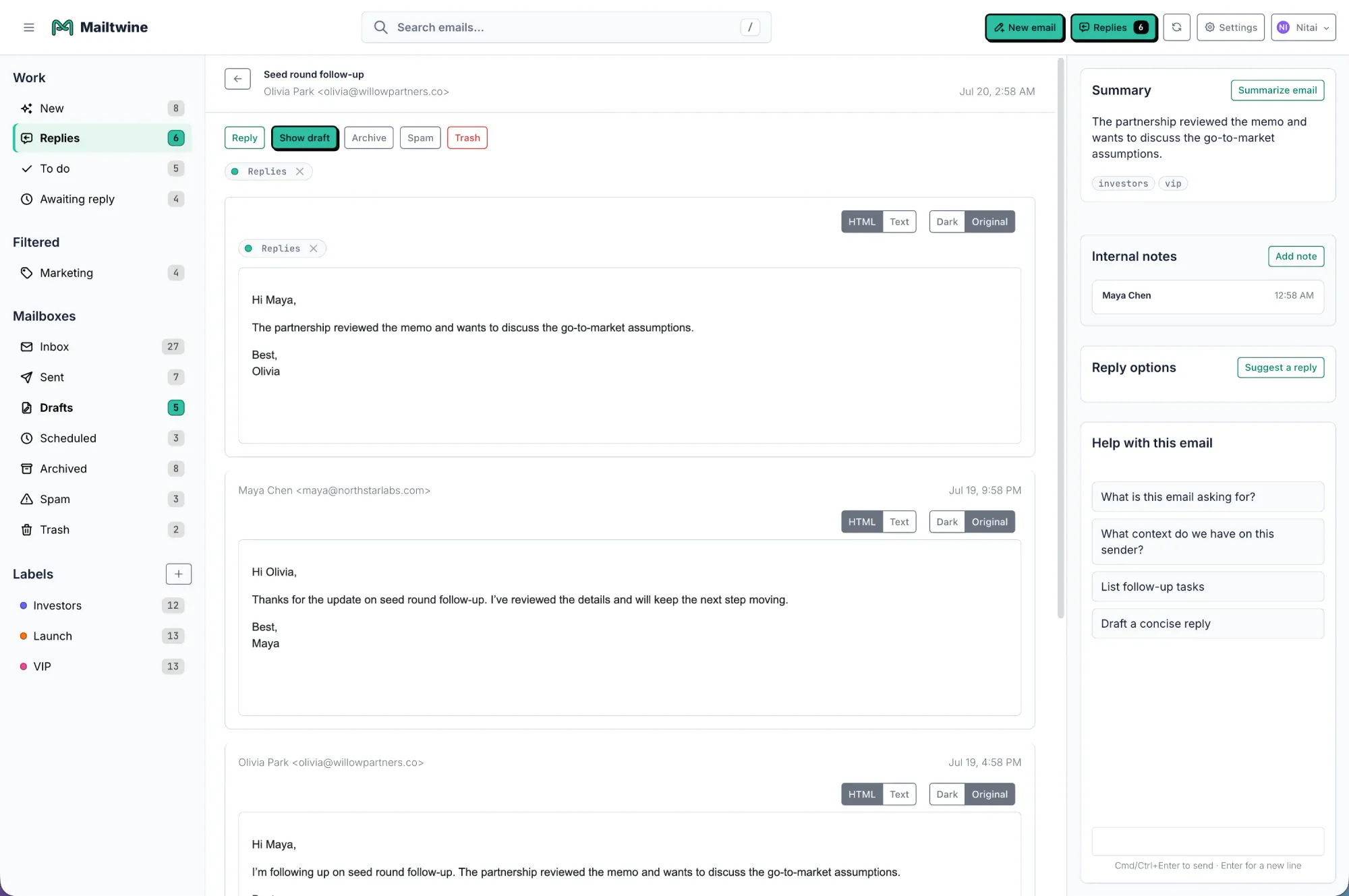
Mailtwine is built to help teams triage incoming email, including summarizing threads alongside prioritization, routing, drafting, and review. That combination matters when the goal is to move a request forward rather than produce a shorter version of it. A teammate reviewing a busy inbox needs context attached to the decision: what the thread is about, what is pending, and where it should go.
For example, a team using Helpmonks, Fastmail, or an IMAP mailbox can use Mailtwine as an AI layer for inbox work without treating summaries as a separate destination. The team can review the context, decide on ownership, and prepare a response within its triage process. Mailtwine's approach to drafting and approval also keeps an important boundary in place: identifying a likely next step does not mean every customer commitment should be sent without a person checking it.
Teams should still review sensitive or ambiguous threads. AI can miss a qualification buried earlier in the conversation, confuse a proposed deadline with an agreed one, or assign too much weight to the latest reply. A summary makes review faster only if it leaves uncertainty visible instead of hiding it behind confident wording.
A quick test before relying on a summary
Take a few representative threads from the inbox: one urgent request, one conversation with several internal participants, one waiting on the customer, and one that has already been resolved. For each AI-generated summary, ask:
- Can a reviewer name the next action without reopening every message?
- Does the status describe the latest state, not just the thread's original subject?
- Is the owner explicit, or clearly marked as unknown?
- Are deadlines copied accurately and distinguished from internal targets?
- Could the summary lead someone to send a response before a key fact is checked?
If a summary fails, correct the handoff before routing or replying. The aim is not to make every summary longer. It is to make the few lines the team reads dependable enough to guide the next decision.
Frequently asked questions
What should an AI email summarizer include for team triage?
It should include the thread's topic, current status, owner, deadline, and next action. It should also surface a key decision or blocker when that changes what the team can do. Unknown owners and unstated deadlines should remain unknown rather than being filled in with guesses.
Can an email summary replace reading the original thread?
Not for every decision. A summary can help a team identify priority, ownership, and likely next action quickly. Before sending a sensitive reply, making a financial commitment, or resolving conflicting information, the owner should check the relevant messages in the original thread.
How is summarization different from email triage?
Summarization captures the context and current state of a conversation. Triage uses that information to decide priority, ownership, routing, and the next step. In a working team inbox, the two reinforce each other: the summary explains the work, and triage makes sure someone acts on it.





