Best AI Email Assistant: How to Choose Between a Basic Summarizer and an Intelligent Email Workflow

If you are comparing the best AI email assistant options, the first question is not "Which tool writes replies fastest?" It is "Which tool actually removes work from the inbox?"
A basic assistant can draft, summarize, and sometimes sort. An intelligent email assistant goes further: it helps decide what matters, who owns it, what should happen next, and whether a human needs to approve the action. That difference matters most in shared inboxes, support queues, and team operations, where the real bottleneck is not typing. It is triage.
Mailtwine is built for that operational layer. It works as email triage software for teams that need prioritization, routing, approvals, and a clean handoff from reading to action. It also connects natively with Helpmonks, Fastmail, IMAP, and Microsoft 365 accounts.
What is an intelligent email assistant?
An intelligent email assistant is software that uses AI to understand incoming messages and help manage the next step. In practice, that can mean summarizing a thread, drafting a response, assigning ownership, routing a request, or deferring non-urgent work.
A basic AI email assistant usually focuses on one task, often writing. An intelligent assistant uses context and workflow rules to support the whole inbox process.
A basic summarizer tells you what a thread says. An intelligent email assistant helps your team decide what to do with it.
That distinction is important if you care about shared accountability. A tool that only drafts replies may save a few minutes. A tool that handles AI inbox management can reduce the time spent sorting, assigning, and following up before work even starts.
Intelligent email assistant vs basic summarizer
| Capability | Basic AI email assistant | Intelligent email assistant |
|---|---|---|
| Summaries | Yes | Yes |
| Drafting help | Yes | Yes |
| Prioritization | Sometimes | Yes, based on context and rules |
| Routing to the right person | Rarely | Yes |
| Approval flows | Rarely | Yes |
| Audit trail | No | Often included |
| Shared inbox ownership | Limited | Built for it |
| Best for | Individual writing help | Team inbox operations |
The main difference is scope. A summarizer helps you read faster. An intelligent assistant helps you move faster.
If your team already knows what to answer but still wastes time deciding who should answer it, you do not need a better writing tool. You need email workflow automation.
What the best AI email assistant should do
When teams evaluate inbox tools, the best one is usually the one that fits the workflow already in place. Look for these capabilities:
1. Classify and prioritize emails
The assistant should identify urgency, topic, sender importance, and likely intent. That is the core of AI email triage. Without it, the inbox still depends on manual scanning.
2. Route messages to the right owner
A useful assistant should support assignment and ownership, not just labeling. In shared inboxes, routing is what turns a pile of messages into a manageable queue.
3. Support approvals before sending
For business teams, AI should not fire off sensitive replies without review. Mailtwine is designed around draft-and-route behavior by default, so people keep control over customer commitments and exceptions.
4. Keep thread context attached to the work
A summary that floats away from the thread is not enough. The tool should keep action items, status, and ownership tied to the message history.
5. Fit the mailbox you already use
Adoption is much easier when teams do not need to migrate. Mailtwine works with Helpmonks, Fastmail, IMAP, and Outlook support is coming for Microsoft 365 accounts.
6. Preserve visibility and audit history
Operational inboxes need a record of what happened, who approved it, and what the next step was. That is especially important for support, success, and revenue teams.
How Mailtwine differs from a generic AI email assistant
Mailtwine is not just an assistant that helps someone write faster. It is designed to help teams manage email as operational work.
| Feature | Generic AI email assistant | Mailtwine |
|---|---|---|
| Draft replies | Yes | Yes |
| Summarize threads | Yes | Yes |
| Sort or prioritize | Sometimes | Yes |
| Route to a teammate | Rarely | Yes |
| Approval-based sending | Rarely | Yes |
| Audit history | No | Yes |
| Shared inbox workflow | Limited | Yes |
| Works as triage software | Not usually | Yes |
If your team is comparing tools for AI inbox management, this is the key question: do you want help writing emails, or do you want a system that handles the first pass of inbox work?
Mailtwine is built for the second.
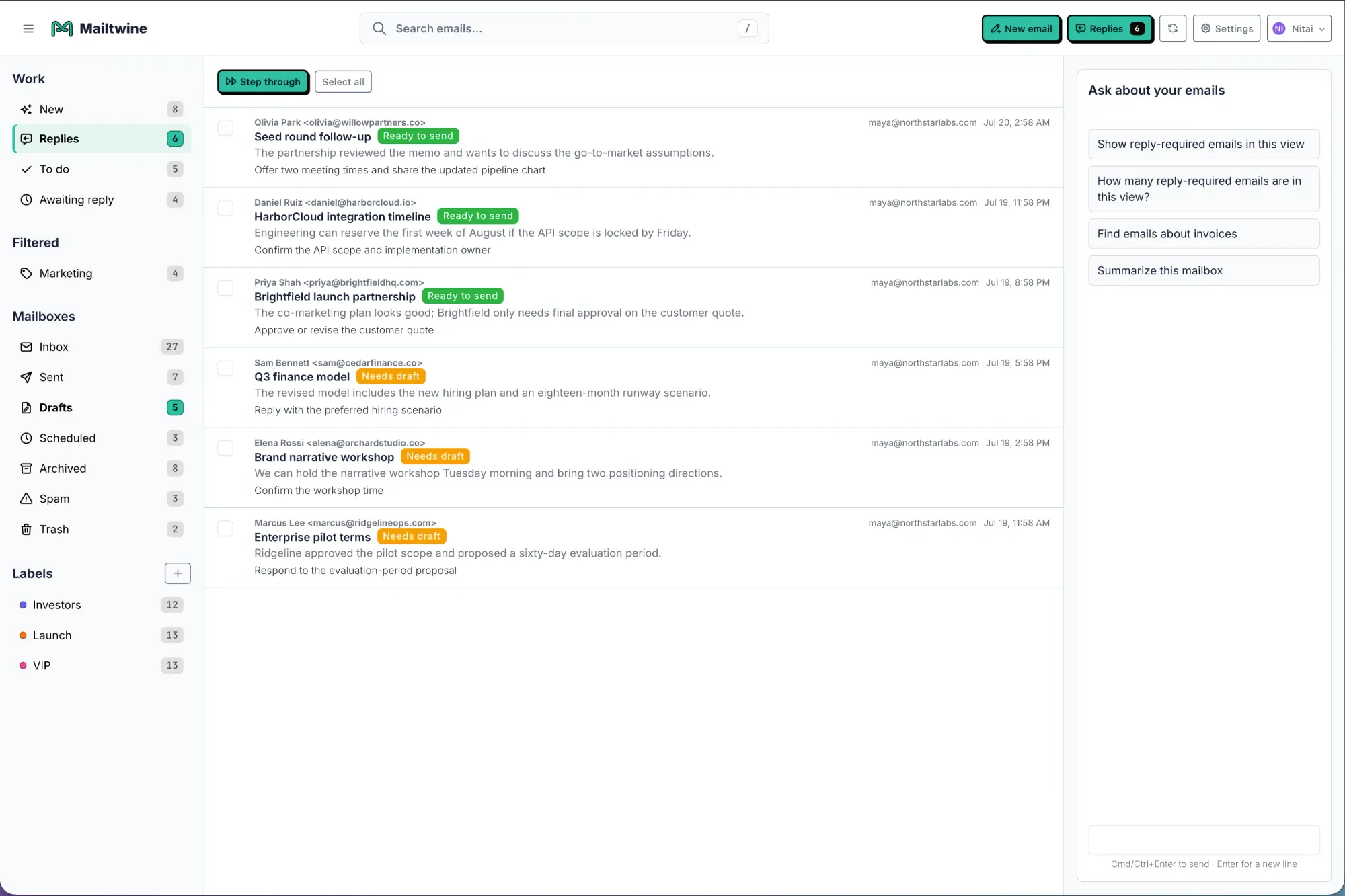
What is email triage and why does it matter here?
Email triage is the process of reviewing, prioritizing, categorizing, and routing incoming messages before they become work. In a manual inbox, people read, re-read, forward, and decide ownership one message at a time. In an AI-assisted inbox, the system handles that first pass.
A good triage flow looks like this:
- Classify the message by topic or type
- Prioritize based on urgency and importance
- Route to the right owner or team
- Draft a response if needed
- Approve before sending
- Follow up if the thread still needs action
That is why how to triage email with AI is such a common use case. The value is not just in reading less. It is in getting to the right next action sooner.
Who should choose an intelligent email assistant?
This category makes the most sense for teams that handle shared or high-volume mail.
Support teams
Support inboxes need priority, ownership, and speed. A useful assistant should identify urgent customer issues first and keep the response flow visible.
Success and account teams
These teams often manage many conversations at once. They need routing, reminders, and thread context, not just drafting help.
Operations and executive teams
Operational inboxes need controlled handoffs, approvals, and a reliable audit trail. A generic writing assistant usually stops short of that.
Teams using shared mailbox systems
If your work happens in Helpmonks, Fastmail, IMAP, or Microsoft 365 accounts, the value is in inbox structure, not just reply generation.
How to choose the best AI email assistant for Gmail or Outlook
If you are comparing tools for Gmail or Outlook, use the same evaluation questions your team would use for any operational software.
Ask these five questions
- Does it help with sorting, or only writing?
- Can it assign ownership to a person or team?
- Does it support approvals before a reply goes out?
- Can it keep thread history and status visible?
- Does it fit your existing mailbox setup?
If the answer is mostly "no," then the tool is probably a summarizer with a writing layer, not an intelligent email workflow system.
For Outlook specifically, the distinction is even clearer. Mailtwine's AI email assistant for Outlook positioning focuses on triage, workflow automation, and approval-based operations rather than just drafting.
How AI for email management works in practice
A strong AI for email management workflow is simple to describe:
- Incoming email arrives
- The system identifies urgency, topic, and likely owner
- Non-urgent work gets deferred
- Important items are routed
- A draft reply may be prepared
- A person reviews before sending
- The thread stays connected to the action record
This is where email workflow automation starts to matter. The goal is not to automate every message. The goal is to remove repetitive triage work so people spend time on decisions, not sorting.
A practical example
Imagine a shared support inbox receives three emails:
- A customer reports a login issue
- A vendor asks for a contract review
- A teammate sends a non-urgent internal question
A basic AI assistant might summarize all three or draft a reply to each.
An intelligent assistant should do more:
- Flag the login issue as urgent
- Route the contract question to the right owner
- Defer the internal note until later
- Draft a grounded response for the support case
- Preserve the record of who approved what
That is the difference between writing help and operational inbox management.
Frequently Asked Questions
What is the difference between an AI email assistant and email automation?
An AI email assistant helps draft, summarize, sort, and respond to messages. Email automation is broader because it can include routing, approval steps, reminders, and follow-up rules. In team inboxes, the best setup usually combines both: AI interprets the message, and automation applies the next action.
Is an AI email assistant the same as AI inbox management?
No. AI inbox management is the category-level idea of using AI to prioritize, route, and defer email work automatically. An AI email assistant may focus on drafting or summarizing, while AI inbox management covers the full operational flow.
What should "best AI email assistant" mean for a team?
For teams, the best AI email assistant is the one that reduces manual triage, not just typing. Look for prioritization, routing, approvals, audit history, and compatibility with your current mailbox.
What is an intelligent email assistant?
An intelligent email assistant is a tool that uses context, thread history, and workflow rules to decide what should happen next in the inbox. It is more useful than a basic summarizer because it helps teams move from reading to action.
Can Mailtwine work as an AI email assistant for Outlook?
Yes, Mailtwine is designed to fit Outlook-focused workflows through its Outlook-specific triage approach. It is built for teams that need structure, approvals, and workflow control more than a lightweight drafting tool.
The bottom line
If you only need help writing or shortening messages, a basic assistant may be enough. If your team needs inbox ownership, routing, approvals, and an audit trail, you want an intelligent email assistant built for workflow.
Mailtwine is designed for that second use case. It helps teams triage emails automatically, keep work attached to the thread, and turn shared inboxes into clear action queues.
Start with email triage software, compare the difference on Compare Mailtwine, or see how it fits specific mailbox setups like AI email triage for Outlook and Microsoft 365.




